


Laravel Docker Lessons · Lesson 10
Run Laravel PHP-FPM and Nginx in one optional Docker container with Supervisor, process status checks, foreground logging and graceful shutdown.
This written tutorial follows the actual lesson-10 source snapshot. The written guide is ready before the video recording.
Continue from Lesson 9, or browse the complete blog.
Earlier lessons use a separate PHP-FPM container and Nginx container. This lesson adds an optional combined container to explain process management: Supervisor starts and monitors both PHP-FPM and Nginx in the foreground. The normal multi-container Compose setup remains available.
Complete file checklist before running commands
Keep docker-compose.yaml as the base service definition and create docker-compose.supervisor.yaml separately. This Supervisor file is standalone on the command line, but its extends entries read web and db from the base file. Do not overwrite the base: a self-reference or missing inherited service will prevent Compose from loading. Create all named configuration files before building. The Dockerfile.supervisor base image must be built from this lesson checkout first.
| File | Action from the previous lesson | Exact source |
|---|---|---|
.docker/nginx/supervisor.conf | Create this file; full code included | View complete file |
.docker/supervisor/supervisord.conf | Create this file; full code included | View complete file |
Dockerfile.supervisor | Create this file; full code included | View complete file |
docker-compose.supervisor.yaml | Create this file; full code included | View complete file |
Dockerfile | Keep the inherited file; inspect the exact snapshot | View complete file |
docker-compose.yaml | Keep the inherited file; inspect the exact snapshot | View complete file |
Use the committed lock files from the same tag. They are download/source links rather than abbreviated code samples: composer.lock, package-lock.json.
Create the configuration directories before saving the files:
New-Item -ItemType Directory -Force .docker/supervisor, .docker/nginxdocker-compose.yaml
x-laravel-environment: &laravel-environment
  DB_URL: ""
  DB_SOCKET: ""
  DB_CONNECTION: mysql
  DB_HOST: db
  DB_PORT: 3306
  DB_DATABASE: laravel_app
  DB_USERNAME: root
  DB_PASSWORD: root
  QUEUE_CONNECTION: database
  DB_QUEUE_RETRY_AFTER: 90

x-laravel-service: &laravel-service
  build:
    context: .
    dockerfile: Dockerfile
  image: my-laravel-app
  working_dir: /var/www/html
  user: "www-data"
  volumes:
    - .:/var/www/html
    - /var/www/html/vendor
    - /var/www/html/node_modules
    - /var/www/html/storage
    - /var/www/html/bootstrap/cache
  environment:
    <<: *laravel-environment
    SCHEDULER_DEMO_ENABLED: "false"
  depends_on:
    db:
      condition: service_healthy

services:
  web:
    <<: *laravel-service

  scheduler:
    <<: *laravel-service
    profiles: ["scheduler"]
    init: true
    command: ["php", "artisan", "schedule:work", "--no-interaction"]
    restart: unless-stopped
    environment:
      <<: *laravel-environment
      CACHE_STORE: file
      SCHEDULER_DEMO_ENABLED: "true"

  worker:
    <<: *laravel-service
    profiles: ["queue"]
    init: true
    command: ["php", "artisan", "queue:work", "database", "--queue=emails", "--sleep=1", "--tries=3", "--timeout=30", "--max-time=3600", "--no-interaction"]
    restart: unless-stopped
    stop_grace_period: 45s

  nginx:
    image: nginx:latest
    ports:
      - "${APP_PORT:-8080}:80"
    volumes:
      - .:/var/www/html:ro
      - ./.docker/nginx/default.conf:/etc/nginx/conf.d/default.conf:ro
    depends_on:
      - web

  db:
    image: mysql:8.0
    environment:
      MYSQL_ROOT_PASSWORD: root
      MYSQL_DATABASE: laravel_app
    ports:
      - "${DB_FORWARD_PORT:-3308}:3306"
    volumes:
      - dbdata:/var/lib/mysql
    healthcheck:
      test: ["CMD-SHELL", "mysqladmin ping -h 127.0.0.1 -p\"$${MYSQL_ROOT_PASSWORD}\" --silent"]
      interval: 5s
      timeout: 5s
      retries: 20
      start_period: 20s

volumes:
  dbdata:
docker-compose.supervisor.yaml
services:
  app:
    extends:
      file: docker-compose.yaml
      service: web
    build:
      context: .
      dockerfile: Dockerfile.supervisor
    image: laravel-supervisor-demo
    user: root
    ports:
      - "${APP_PORT:-8080}:80"
    restart: unless-stopped
    stop_grace_period: 45s
  db:
    extends:
      file: docker-compose.yaml
      service: db
volumes:
  dbdata:
Check that both files exist with their exact names before running Compose:
Get-Item .\docker-compose.yaml, .\docker-compose.supervisor.yamlRecording preparation and follow-up checks
Build the base PHP image before the combined Supervisor image. This topology names the Laravel service app, so use exec app. FastCGI targets 127.0.0.1:9000 inside the combined container; the normal separate Nginx service uses web:9000. Stop the previous selected stack before reusing its browser port.
Before recording, follow the recording checklist and PowerShell preflight. Current main excludes generated bootstrap config cache and public/hot from Docker build context. For historical tags, clear old host config cache before rebuilding and renew PHP runtime volumes so earlier database settings are not reused.
Build the combined image
Dockerfile.supervisor builds from the project's my-laravel-app image. Build the base image first so the combined image includes this checkout's PHP extensions, Composer, Node, npm and application dependencies. It installs Debian's Nginx and Supervisor packages, copies the two configuration files and uses Supervisor as its foreground entry command.
docker compose build web
docker compose -f docker-compose.supervisor.yaml build app
The combined container uses root for Supervisor and the Nginx master, allowing Nginx to bind port 80. Nginx workers and PHP-FPM pool workers use www-data. Supervisor's control interface is a local Unix socket; no public management TCP port is added. Do not expose FastCGI port 9000 to the host.
Start the optional topology
Prepare .env and its application key using Lesson 8 first. Stop the previous stack to free port 8080, retaining its volumes. The standalone Supervisor Compose file reuses the existing MySQL service and dbdata named volume when you use the same Compose project name.
docker compose down
docker compose -f docker-compose.supervisor.yaml up -d db app
docker compose -f docker-compose.supervisor.yaml exec --user www-data app php artisan config:clear
docker compose -f docker-compose.supervisor.yaml exec --user www-data app php artisan migrate --force
docker compose -f docker-compose.supervisor.yaml exec app supervisorctl status
docker compose -f docker-compose.supervisor.yaml exec app nginx -t
Expect nginx and php-fpm to be RUNNING. Open http://localhost:8080/queue-demo/mail-preview for a Blade page that does not send email. /scheduler-demo also remains available after SQL migrations. APP_PORT can change the host application port.
Understand the two configurations
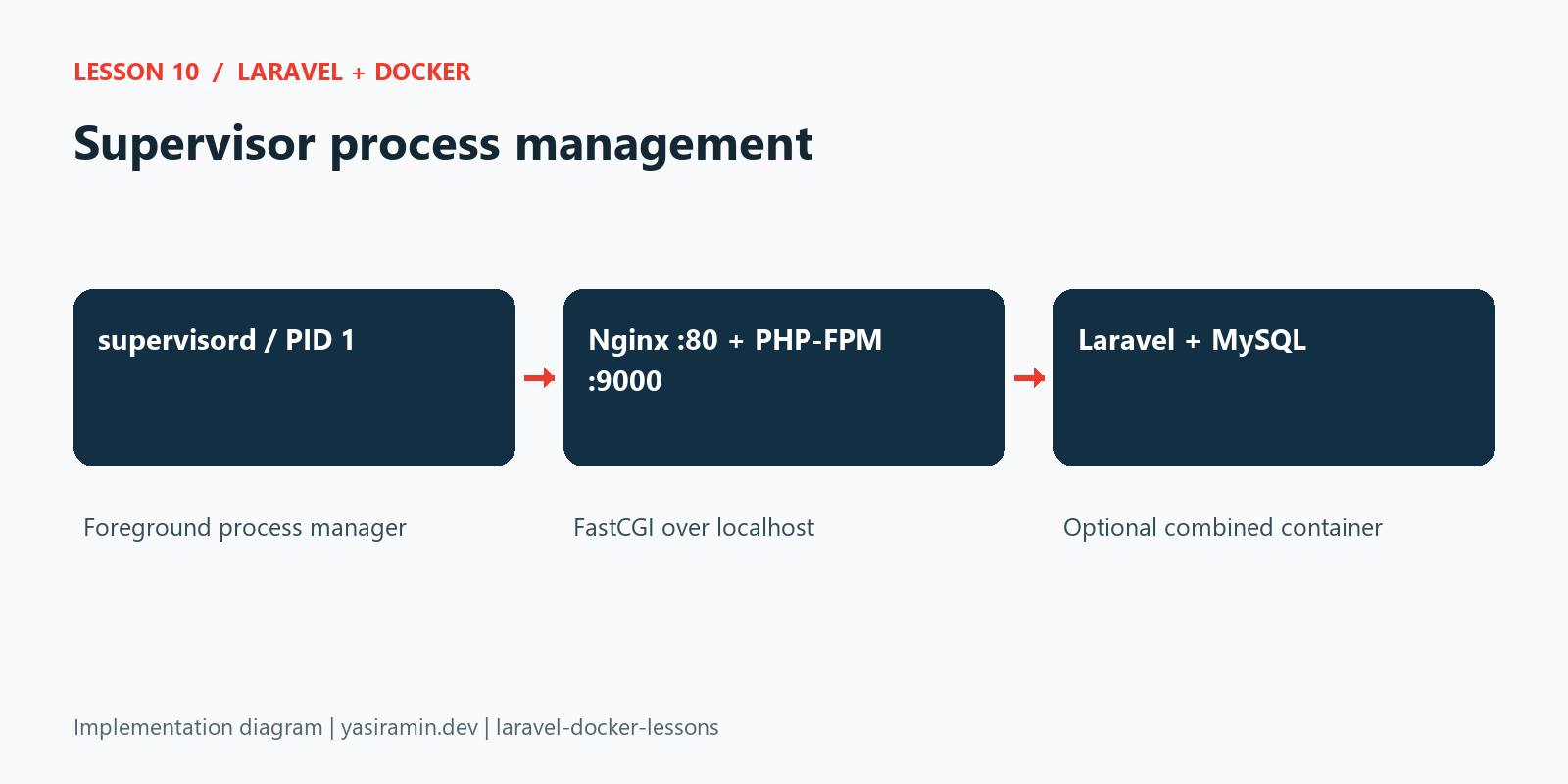
.docker/supervisor/supervisord.conf enables foreground mode, a local control socket, automatic restart of unexpectedly exited services and logs to Docker stdout/stderr. Rotation is disabled for these special output streams. PHP-FPM runs with -F; Nginx runs with daemon off;. Neither forks into the background and disappears from supervision.
.docker/nginx/supervisor.conf points FastCGI to 127.0.0.1:9000, because both processes share one container. The earlier separate Nginx container uses web:9000; copying that hostname into this combined topology would be incorrect. Both configurations serve Laravel's public directory and pass unmatched requests to index.php.
Supervisor starts PHP-FPM before Nginx. Process priority controls start order, not application readiness; a very early request can still need a retry. The database health check separately gates container startup. Laravel migrations remain an explicit command rather than running every time a process restarts.
Inspect process recovery and logs
docker compose -f docker-compose.supervisor.yaml exec app supervisorctl restart php-fpm
docker compose -f docker-compose.supervisor.yaml exec app supervisorctl status
docker compose -f docker-compose.supervisor.yaml logs --tail=40 app
Restarting PHP briefly interrupts requests; use it only in this local teaching demo. Supervisor restarts processes inside the container, while Docker's restart policy handles a stopped container. These are different lifecycles. This example does not also start a queue worker or scheduler inside Supervisor, preventing duplicate background processing.
Stop gracefully
docker compose -f docker-compose.supervisor.yaml downThe image uses SIGTERM for Supervisor. It forwards configured shutdown signals to the child process groups; PHP-FPM and Nginx receive QUIT for a graceful exit. The Compose grace period allows time for shutdown. Omit -v to retain the database. For independent scaling, the existing separate-container topology is still available.
How the implementation fits together
Configuration and source code
The following files are read directly from this lesson’s Git tag. Later lessons add further capabilities; they do not change this snapshot.
Dockerfile
FROM php:8.2-fpm

WORKDIR /var/www/html

RUN apt-get update && apt-get install -y \
    libzip-dev \
    libpq-dev \
    unzip \
    && docker-php-ext-install zip pdo_mysql pdo_pgsql pcntl \
    && rm -rf /var/lib/apt/lists/*

RUN pecl install mongodb-1.21.2 \
    && docker-php-ext-enable mongodb

COPY --from=composer:2 /usr/bin/composer /usr/local/bin/composer
ENV COMPOSER_HOME=/tmp/composer

COPY --from=node:22-bookworm-slim /usr/local/bin/node /usr/local/bin/node
COPY --from=node:22-bookworm-slim /usr/local/lib/node_modules /usr/local/lib/node_modules
RUN ln -s ../lib/node_modules/npm/bin/npm-cli.js /usr/local/bin/npm \
    && ln -s ../lib/node_modules/npm/bin/npx-cli.js /usr/local/bin/npx \
    && node --version && npm --version
ENV NPM_CONFIG_CACHE=/tmp/npm-cache

COPY --chown=www-data:www-data . /var/www/html

RUN COMPOSER_ALLOW_SUPERUSER=1 composer install --no-interaction --prefer-dist --optimize-autoloader \
    && mkdir -p node_modules \
    && chown -R www-data:www-data vendor storage bootstrap/cache node_modules /tmp/composer \
    && chmod -R 775 storage bootstrap/cache
Dockerfile.supervisor
FROM my-laravel-app:latest

USER root

RUN apt-get update && apt-get install -y --no-install-recommends nginx supervisor \
    && rm -rf /var/lib/apt/lists/* \
    && rm -f /etc/nginx/sites-enabled/default

COPY .docker/nginx/supervisor.conf /etc/nginx/conf.d/laravel.conf
COPY .docker/supervisor/supervisord.conf /etc/supervisor/supervisord.conf

EXPOSE 80
STOPSIGNAL SIGTERM
CMD ["/usr/bin/supervisord", "-c", "/etc/supervisor/supervisord.conf"]
.docker/supervisor/supervisord.conf
[unix_http_server]
file=/tmp/supervisor.sock
chmod=0700

[supervisord]
nodaemon=true
user=root
pidfile=/tmp/supervisord.pid
logfile=/dev/stdout
logfile_maxbytes=0

[rpcinterface:supervisor]
supervisor.rpcinterface_factory=supervisor.rpcinterface:make_main_rpcinterface

[supervisorctl]
serverurl=unix:///tmp/supervisor.sock

[program:php-fpm]
command=/usr/local/sbin/php-fpm -F
priority=10
autostart=true
autorestart=true
startsecs=3
stopsignal=QUIT
stopwaitsecs=20
stopasgroup=true
killasgroup=true
stdout_logfile=/dev/stdout
stdout_logfile_maxbytes=0
stderr_logfile=/dev/stderr
stderr_logfile_maxbytes=0

[program:nginx]
command=/usr/sbin/nginx -g "daemon off;"
priority=20
autostart=true
autorestart=true
startsecs=3
stopsignal=QUIT
stopwaitsecs=20
stopasgroup=true
killasgroup=true
stdout_logfile=/dev/stdout
stdout_logfile_maxbytes=0
stderr_logfile=/dev/stderr
stderr_logfile_maxbytes=0
.docker/nginx/supervisor.conf
server {
    listen 80;
    index index.php index.html;
    root /var/www/html/public;
    access_log /dev/stdout;
    error_log /dev/stderr;

    location / {
        try_files $uri $uri/ /index.php?$query_string;
    }

    location ~ \.php$ {
        include fastcgi_params;
        fastcgi_pass 127.0.0.1:9000;
        fastcgi_index index.php;
        fastcgi_param SCRIPT_FILENAME $realpath_root$fastcgi_script_name;
        fastcgi_param PATH_INFO $fastcgi_path_info;
        fastcgi_buffers 16 16k;
        fastcgi_buffer_size 32k;
    }

    location ~ /\.ht {
        deny all;
    }
}
Verification performed
The optional combined image built successfully. Supervisor reported both nginx and php-fpm RUNNING, nginx -t passed, and the Blade email preview returned HTTP 200. After supervisorctl restart php-fpm, its process ID changed and the page still returned HTTP 200. Docker stop delivered SIGTERM to Supervisor; both child services exited with status 0.