


Laravel Docker Lessons · Lesson 7
Connect Laravel to MongoDB using separate username and password settings, and install the native PHP driver and locked dependencies entirely inside Docker.
Corrected recording snapshot: use lesson-7.1. This revision replaces the original host-extension preparation and connection-string configuration. The written guide is available before the recorded video.
This corrected lesson configures MongoDB using separate host, port, database, username, password and authentication-database settings. PHP, the MongoDB extension and Composer dependency installation all run inside Docker. Windows needs Docker Desktop and the source files; it needs no PHP installation, Composer installation or MongoDB DLL for this demonstration.
Use the corrected lesson-7.1 snapshot for recording. The original lesson-7 remains historical. Current main also has the corrected connection settings, together with later lessons' tooling. This revised Lesson 7 Dockerfile uses Composer temporarily during the image build and removes its executable afterward. Lesson 8 separately introduces Composer as a permanent container tool.
Keep both Compose files
Keep docker-compose.yaml as the base PHP/Nginx/MySQL setup and create docker-compose.mongodb.yaml as its sibling. Pass both files to every command. Do not overwrite the base with the MongoDB override. SQL remains the default connection for users, sessions and queues; MongoNote explicitly selects the named MongoDB connection.
Prepare all files shown in this article before startup: Dockerfile, .dockerignore, the Composer manifest and lock file, .env.example, config/database.php, both Compose files, model, console command, route and Blade view. Use the exact lock file from lesson-7.1. The Docker context excludes host vendor, and the image installs its own locked dependencies.
Configure username and password separately
The private environment uses these local tutorial defaults:
MONGODB_HOST=mongo
MONGODB_PORT=27017
MONGODB_DATABASE=laravel_demo
MONGODB_USERNAME=lesson
MONGODB_PASSWORD=local-mongo-password
MONGODB_AUTH_DATABASE=admin
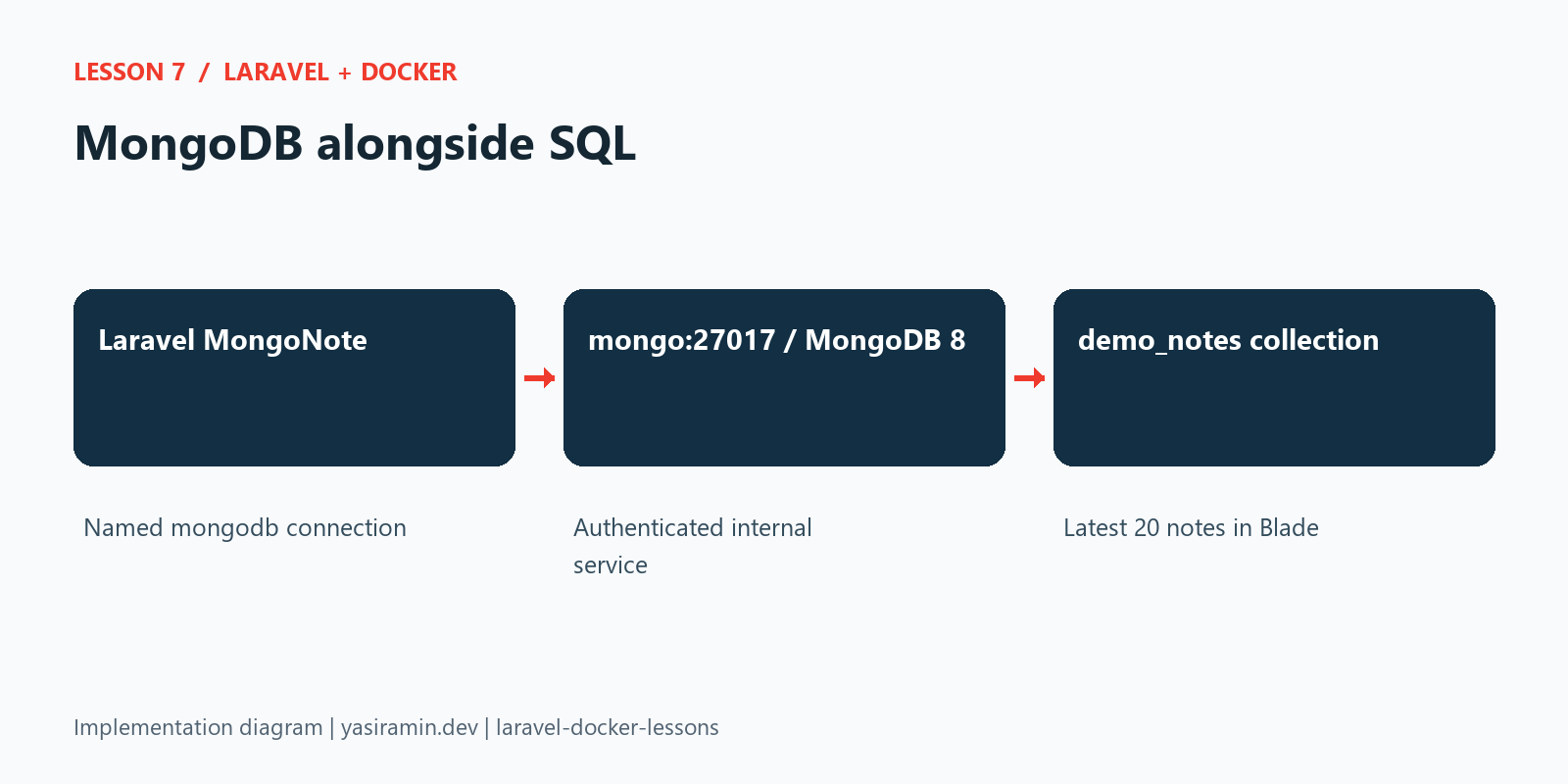
config/database.php reads host, port, database, username, password and options.authSource; it does not read a connection URL. The driver receives credentials separately, so passwords containing reserved characters do not need URL encoding. The authentication database is admin because this local example uses the root user initialized by the official image. The application collection lives in laravel_demo.
The Compose override injects these named settings into web and uses the same username/password to initialize MongoDB. mongo:27017 is an internal Docker address, with no published MongoDB host port. Use private credentials and a restricted application user for a real deployment. Set your chosen username/password before initializing a new data volume. Changing initialization variables does not update users already stored in an existing database; preserve any data you need.
Complete files to prepare before startup
Save every file below before running the Docker commands. The base and MongoDB Compose files are separate. All code comes from the corrected lesson-7.1 tag.
Download the matching composer.lock together with composer.json. Composer install honors that lock; changing only the manifest does not update the lock.
docker-compose.yaml
x-laravel-environment: &laravel-environment
  DB_URL: ""
  DB_SOCKET: ""
  DB_CONNECTION: mysql
  DB_HOST: db
  DB_PORT: 3306
  DB_DATABASE: laravel_app
  DB_USERNAME: root
  DB_PASSWORD: root
  QUEUE_CONNECTION: database
  DB_QUEUE_RETRY_AFTER: 90

x-laravel-service: &laravel-service
  build:
    context: .
    dockerfile: Dockerfile
  image: my-laravel-app
  working_dir: /var/www/html
  user: "www-data"
  volumes:
    - .:/var/www/html
    - /var/www/html/vendor
    - /var/www/html/storage
    - /var/www/html/bootstrap/cache
  environment:
    <<: *laravel-environment
    SCHEDULER_DEMO_ENABLED: "false"
  depends_on:
    db:
      condition: service_healthy

services:
  web:
    <<: *laravel-service

  scheduler:
    <<: *laravel-service
    profiles: ["scheduler"]
    init: true
    command: ["php", "artisan", "schedule:work", "--no-interaction"]
    restart: unless-stopped
    environment:
      <<: *laravel-environment
      CACHE_STORE: file
      SCHEDULER_DEMO_ENABLED: "true"

  worker:
    <<: *laravel-service
    profiles: ["queue"]
    init: true
    command: ["php", "artisan", "queue:work", "database", "--queue=emails", "--sleep=1", "--tries=3", "--timeout=30", "--max-time=3600", "--no-interaction"]
    restart: unless-stopped
    stop_grace_period: 45s

  nginx:
    image: nginx:latest
    ports:
      - "${APP_PORT:-8080}:80"
    volumes:
      - .:/var/www/html:ro
      - ./.docker/nginx/default.conf:/etc/nginx/conf.d/default.conf:ro
    depends_on:
      - web

  db:
    image: mysql:8.0
    environment:
      MYSQL_ROOT_PASSWORD: root
      MYSQL_DATABASE: laravel_app
    ports:
      - "${DB_FORWARD_PORT:-3308}:3306"
    volumes:
      - dbdata:/var/lib/mysql
    healthcheck:
      test: ["CMD-SHELL", "mysqladmin ping -h 127.0.0.1 -p\"$${MYSQL_ROOT_PASSWORD}\" --silent"]
      interval: 5s
      timeout: 5s
      retries: 20
      start_period: 20s

volumes:
  dbdata:
docker-compose.mongodb.yaml
services:
  web:
    environment:
      MONGODB_HOST: mongo
      MONGODB_PORT: 27017
      MONGODB_DATABASE: ${MONGODB_DATABASE:-laravel_demo}
      MONGODB_USERNAME: ${MONGODB_USERNAME:-lesson}
      MONGODB_PASSWORD: ${MONGODB_PASSWORD:-local-mongo-password}
      MONGODB_AUTH_DATABASE: ${MONGODB_AUTH_DATABASE:-admin}
    depends_on:
      mongo:
        condition: service_healthy
  mongo:
    image: mongo:8.0
    environment:
      MONGO_INITDB_ROOT_USERNAME: ${MONGODB_USERNAME:-lesson}
      MONGO_INITDB_ROOT_PASSWORD: ${MONGODB_PASSWORD:-local-mongo-password}
    volumes:
      - mongodata:/data/db
    healthcheck:
      test: ["CMD-SHELL", "mongosh --quiet --host 127.0.0.1 --username \"$${MONGO_INITDB_ROOT_USERNAME}\" --password \"$${MONGO_INITDB_ROOT_PASSWORD}\" --authenticationDatabase admin --eval 'quit(db.adminCommand({ping:1}).ok ? 0 : 1)'"]
      interval: 5s
      timeout: 10s
      retries: 20
      start_period: 20s
volumes:
  mongodata:
Dockerfile
FROM php:8.2-fpm

WORKDIR /var/www/html

RUN apt-get update && apt-get install -y \
    libzip-dev \
    libpq-dev \
    unzip \
    && docker-php-ext-install zip pdo_mysql pdo_pgsql pcntl \
    && rm -rf /var/lib/apt/lists/*

RUN pecl install mongodb-1.21.2 \
    && docker-php-ext-enable mongodb

COPY --from=composer:2 /usr/bin/composer /tmp/composer.phar

COPY --chown=www-data:www-data . /var/www/html

RUN COMPOSER_ALLOW_SUPERUSER=1 COMPOSER_HOME=/tmp/composer-build php /tmp/composer.phar install --no-interaction --prefer-dist --optimize-autoloader \
    && chown -R www-data:www-data vendor storage bootstrap/cache \
    && chmod -R 775 storage bootstrap/cache \
    && rm -f /tmp/composer.phar \
    && rm -rf /tmp/composer-build
.dockerignore
.git
.env
.env.*
!.env.example
node_modules
vendor
output
.phpunit.cache
bootstrap/cache/*.php
public/hot
database/*.sqlite*
storage/logs/*
storage/framework/cache/data/*
storage/framework/sessions/*
storage/framework/views/*
composer.json
{
    "$schema": "https://getcomposer.org/schema.json",
    "name": "laravel/laravel",
    "type": "project",
    "description": "The skeleton application for the Laravel framework.",
    "keywords": [
        "laravel",
        "framework"
    ],
    "license": "MIT",
    "require": {
        "php": "^8.2",
        "laravel/framework": "^12.0",
        "laravel/tinker": "^2.10.1",
        "mongodb/laravel-mongodb": "^5.11"
    },
    "require-dev": {
        "fakerphp/faker": "^1.23",
        "laravel/pail": "^1.2.2",
        "laravel/pint": "^1.24",
        "laravel/sail": "^1.41",
        "mockery/mockery": "^1.6",
        "nunomaduro/collision": "^8.6",
        "pestphp/pest": "^3.8",
        "pestphp/pest-plugin-laravel": "^3.2"
    },
    "autoload": {
        "psr-4": {
            "App\\": "app/",
            "Database\\Factories\\": "database/factories/",
            "Database\\Seeders\\": "database/seeders/"
        }
    },
    "autoload-dev": {
        "psr-4": {
            "Tests\\": "tests/"
        }
    },
    "scripts": {
        "setup": [
            "composer install",
            "@php -r \"file_exists('.env') || copy('.env.example', '.env');\"",
            "@php artisan key:generate",
            "@php artisan migrate --force",
            "npm install",
            "npm run build"
        ],
        "dev": [
            "Composer\\Config::disableProcessTimeout",
            "npx concurrently -c \"#93c5fd,#c4b5fd,#fb7185,#fdba74\" \"php artisan serve\" \"php artisan queue:listen --tries=1 --timeout=0\" \"php artisan pail --timeout=0\" \"npm run dev\" --names=server,queue,logs,vite --kill-others"
        ],
        "test": [
            "@php artisan config:clear --ansi",
            "@php artisan test"
        ],
        "post-autoload-dump": [
            "Illuminate\\Foundation\\ComposerScripts::postAutoloadDump",
            "@php artisan package:discover --ansi"
        ],
        "post-update-cmd": [
            "@php artisan vendor:publish --tag=laravel-assets --ansi --force"
        ],
        "post-root-package-install": [
            "@php -r \"file_exists('.env') || copy('.env.example', '.env');\""
        ],
        "post-create-project-cmd": [
            "@php artisan key:generate --ansi",
            "@php -r \"file_exists('database/database.sqlite') || touch('database/database.sqlite');\"",
            "@php artisan migrate --graceful --ansi"
        ],
        "pre-package-uninstall": [
            "Illuminate\\Foundation\\ComposerScripts::prePackageUninstall"
        ]
    },
    "extra": {
        "laravel": {
            "dont-discover": []
        }
    },
    "config": {
        "optimize-autoloader": true,
        "preferred-install": "dist",
        "sort-packages": true,
        "allow-plugins": {
            "pestphp/pest-plugin": true,
            "php-http/discovery": true
        }
    },
    "minimum-stability": "stable",
    "prefer-stable": true
}
.env.example
APP_NAME=Laravel
APP_ENV=local
APP_KEY=
APP_DEBUG=true
APP_URL=http://localhost

# Lesson 4: opt in only while recording/running the test-user example.
SCHEDULER_DEMO_ENABLED=false

APP_LOCALE=en
APP_FALLBACK_LOCALE=en
APP_FAKER_LOCALE=en_US

APP_MAINTENANCE_DRIVER=file
# APP_MAINTENANCE_STORE=database

# PHP_CLI_SERVER_WORKERS=4

BCRYPT_ROUNDS=12

LOG_CHANNEL=stack
LOG_STACK=single
LOG_DEPRECATIONS_CHANNEL=null
LOG_LEVEL=debug

DB_CONNECTION=sqlite
# DB_HOST=127.0.0.1
# DB_PORT=3306
# DB_DATABASE=laravel
# DB_USERNAME=root
# DB_PASSWORD=

# Lesson 7: optional MongoDB connection; SQL remains the default database.
MONGODB_HOST=mongo
MONGODB_PORT=27017
MONGODB_DATABASE=laravel_demo
MONGODB_USERNAME=lesson
MONGODB_PASSWORD=local-mongo-password
MONGODB_AUTH_DATABASE=admin

SESSION_DRIVER=database
SESSION_LIFETIME=120
SESSION_ENCRYPT=false
SESSION_PATH=/
SESSION_DOMAIN=null

BROADCAST_CONNECTION=log
FILESYSTEM_DISK=local
QUEUE_CONNECTION=database

CACHE_STORE=database
# CACHE_PREFIX=

MEMCACHED_HOST=127.0.0.1

REDIS_CLIENT=phpredis
REDIS_HOST=127.0.0.1
REDIS_PASSWORD=null
REDIS_PORT=6379

MAIL_MAILER=log
MAIL_SCHEME=null
MAIL_HOST=127.0.0.1
MAIL_PORT=2525
MAIL_USERNAME=null
MAIL_PASSWORD=null
MAIL_FROM_ADDRESS="hello@example.com"
MAIL_FROM_NAME="${APP_NAME}"

# Lesson 5: copy these credentials from your Mailtrap Email Sandbox, not Email Sending.
# The queued demo explicitly uses the mailtrap mailer with the MAIL_* keys above.
# For Lesson 5, set MAIL_HOST=sandbox.smtp.mailtrap.io and private Sandbox credentials.

AWS_ACCESS_KEY_ID=
AWS_SECRET_ACCESS_KEY=
AWS_DEFAULT_REGION=us-east-1
AWS_BUCKET=
AWS_USE_PATH_STYLE_ENDPOINT=false

VITE_APP_NAME="${APP_NAME}"
config/database.php
<?php

use Illuminate\Support\Str;
use Pdo\Mysql;

return [

    /*
    |--------------------------------------------------------------------------
    | Default Database Connection Name
    |--------------------------------------------------------------------------
    |
    | Here you may specify which of the database connections below you wish
    | to use as your default connection for database operations. This is
    | the connection which will be utilized unless another connection
    | is explicitly specified when you execute a query / statement.
    |
    */

    'default' => env('DB_CONNECTION', 'sqlite'),

    /*
    |--------------------------------------------------------------------------
    | Database Connections
    |--------------------------------------------------------------------------
    |
    | Below are all of the database connections defined for your application.
    | An example configuration is provided for each database system which
    | is supported by Laravel. You're free to add / remove connections.
    |
    */

    'connections' => [

        'mongodb' => [
            'driver' => 'mongodb',
            'host' => env('MONGODB_HOST', 'mongo'),
            'port' => (int) env('MONGODB_PORT', 27017),
            'database' => env('MONGODB_DATABASE', 'laravel_demo'),
            'username' => env('MONGODB_USERNAME', 'lesson'),
            'password' => env('MONGODB_PASSWORD', 'local-mongo-password'),
            'options' => [
                'authSource' => env('MONGODB_AUTH_DATABASE', 'admin'),
                'serverSelectionTimeoutMS' => 5000,
                'connectTimeoutMS' => 5000,
            ],
        ],

        'sqlite' => [
            'driver' => 'sqlite',
            'url' => env('DB_URL'),
            'database' => env('DB_DATABASE', database_path('database.sqlite')),
            'prefix' => '',
            'foreign_key_constraints' => env('DB_FOREIGN_KEYS', true),
            'busy_timeout' => null,
            'journal_mode' => null,
            'synchronous' => null,
            'transaction_mode' => 'DEFERRED',
        ],

        'mysql' => [
            'driver' => 'mysql',
            'url' => env('DB_URL'),
            'host' => env('DB_HOST', '127.0.0.1'),
            'port' => env('DB_PORT', '3306'),
            'database' => env('DB_DATABASE', 'laravel'),
            'username' => env('DB_USERNAME', 'root'),
            'password' => env('DB_PASSWORD', ''),
            'unix_socket' => env('DB_SOCKET', ''),
            'charset' => env('DB_CHARSET', 'utf8mb4'),
            'collation' => env('DB_COLLATION', 'utf8mb4_unicode_ci'),
            'prefix' => '',
            'prefix_indexes' => true,
            'strict' => true,
            'engine' => null,
            'options' => extension_loaded('pdo_mysql') ? array_filter([
                (PHP_VERSION_ID >= 80500 ? Mysql::ATTR_SSL_CA : PDO::MYSQL_ATTR_SSL_CA) => env('MYSQL_ATTR_SSL_CA'),
            ]) : [],
        ],

        'mariadb' => [
            'driver' => 'mariadb',
            'url' => env('DB_URL'),
            'host' => env('DB_HOST', '127.0.0.1'),
            'port' => env('DB_PORT', '3306'),
            'database' => env('DB_DATABASE', 'laravel'),
            'username' => env('DB_USERNAME', 'root'),
            'password' => env('DB_PASSWORD', ''),
            'unix_socket' => env('DB_SOCKET', ''),
            'charset' => env('DB_CHARSET', 'utf8mb4'),
            'collation' => env('DB_COLLATION', 'utf8mb4_unicode_ci'),
            'prefix' => '',
            'prefix_indexes' => true,
            'strict' => true,
            'engine' => null,
            'options' => extension_loaded('pdo_mysql') ? array_filter([
                (PHP_VERSION_ID >= 80500 ? Mysql::ATTR_SSL_CA : PDO::MYSQL_ATTR_SSL_CA) => env('MYSQL_ATTR_SSL_CA'),
            ]) : [],
        ],

        'pgsql' => [
            'driver' => 'pgsql',
            'url' => env('DB_URL'),
            'host' => env('DB_HOST', '127.0.0.1'),
            'port' => env('DB_PORT', '5432'),
            'database' => env('DB_DATABASE', 'laravel'),
            'username' => env('DB_USERNAME', 'root'),
            'password' => env('DB_PASSWORD', ''),
            'charset' => env('DB_CHARSET', 'utf8'),
            'prefix' => '',
            'prefix_indexes' => true,
            'search_path' => 'public',
            'sslmode' => env('DB_SSLMODE', 'prefer'),
        ],

        'sqlsrv' => [
            'driver' => 'sqlsrv',
            'url' => env('DB_URL'),
            'host' => env('DB_HOST', 'localhost'),
            'port' => env('DB_PORT', '1433'),
            'database' => env('DB_DATABASE', 'laravel'),
            'username' => env('DB_USERNAME', 'root'),
            'password' => env('DB_PASSWORD', ''),
            'charset' => env('DB_CHARSET', 'utf8'),
            'prefix' => '',
            'prefix_indexes' => true,
            // 'encrypt' => env('DB_ENCRYPT', 'yes'),
            // 'trust_server_certificate' => env('DB_TRUST_SERVER_CERTIFICATE', 'false'),
        ],

    ],

    /*
    |--------------------------------------------------------------------------
    | Migration Repository Table
    |--------------------------------------------------------------------------
    |
    | This table keeps track of all the migrations that have already run for
    | your application. Using this information, we can determine which of
    | the migrations on disk haven't actually been run on the database.
    |
    */

    'migrations' => [
        'table' => 'migrations',
        'update_date_on_publish' => true,
    ],

    /*
    |--------------------------------------------------------------------------
    | Redis Databases
    |--------------------------------------------------------------------------
    |
    | Redis is an open source, fast, and advanced key-value store that also
    | provides a richer body of commands than a typical key-value system
    | such as Memcached. You may define your connection settings here.
    |
    */

    'redis' => [

        'client' => env('REDIS_CLIENT', 'phpredis'),

        'options' => [
            'cluster' => env('REDIS_CLUSTER', 'redis'),
            'prefix' => env('REDIS_PREFIX', Str::slug((string) env('APP_NAME', 'laravel')).'-database-'),
            'persistent' => env('REDIS_PERSISTENT', false),
        ],

        'default' => [
            'url' => env('REDIS_URL'),
            'host' => env('REDIS_HOST', '127.0.0.1'),
            'username' => env('REDIS_USERNAME'),
            'password' => env('REDIS_PASSWORD'),
            'port' => env('REDIS_PORT', '6379'),
            'database' => env('REDIS_DB', '0'),
            'max_retries' => env('REDIS_MAX_RETRIES', 3),
            'backoff_algorithm' => env('REDIS_BACKOFF_ALGORITHM', 'decorrelated_jitter'),
            'backoff_base' => env('REDIS_BACKOFF_BASE', 100),
            'backoff_cap' => env('REDIS_BACKOFF_CAP', 1000),
        ],

        'cache' => [
            'url' => env('REDIS_URL'),
            'host' => env('REDIS_HOST', '127.0.0.1'),
            'username' => env('REDIS_USERNAME'),
            'password' => env('REDIS_PASSWORD'),
            'port' => env('REDIS_PORT', '6379'),
            'database' => env('REDIS_CACHE_DB', '1'),
            'max_retries' => env('REDIS_MAX_RETRIES', 3),
            'backoff_algorithm' => env('REDIS_BACKOFF_ALGORITHM', 'decorrelated_jitter'),
            'backoff_base' => env('REDIS_BACKOFF_BASE', 100),
            'backoff_cap' => env('REDIS_BACKOFF_CAP', 1000),
        ],

    ],

];
app/Models/MongoNote.php
<?php

namespace App\Models;

use MongoDB\Laravel\Eloquent\Model;

class MongoNote extends Model
{
    protected $connection = 'mongodb';

    protected $table = 'demo_notes';

    protected $fillable = ['message'];
}
app/Console/Commands/CreateMongoNote.php
<?php

namespace App\Console\Commands;

use App\Models\MongoNote;
use Illuminate\Console\Command;

class CreateMongoNote extends Command
{
    protected $signature = 'demo:mongo-note {message=Hello from Laravel and MongoDB}';

    protected $description = 'Create one tutorial note in the MongoDB demo_notes collection';

    public function handle(): int
    {
        $message = trim($this->argument('message'));
        if ($message === '' || mb_strlen($message) > 500) {
            $this->error('Use a message between 1 and 500 characters.');

            return self::FAILURE;
        }

        $note = MongoNote::create(['message' => $message]);
        $this->info('Created MongoDB note '.$note->getKey());

        return self::SUCCESS;
    }
}
routes/web.php
<?php

use App\Http\Controllers\SchedulerDemoController;
use App\Mail\QueueDemoMail;
use App\Models\MongoNote;
use Illuminate\Support\Facades\Route;

Route::get('/', function () {
    return view('welcome');
});

Route::get('/scheduler-demo', SchedulerDemoController::class)->name('scheduler-demo');

Route::get('/queue-demo/mail-preview', fn () => new QueueDemoMail('Laravel Developer', 'preview-only'))
    ->name('queue-demo.mail-preview');

Route::get('/mongo-demo', fn () => view('mongo-demo', [
    'notes' => MongoNote::orderByDesc('created_at')->limit(20)->get(),
]))->name('mongo-demo');
resources/views/mongo-demo.blade.php
<!doctype html>
<html lang="en">
<head><meta charset="utf-8"><meta name="viewport" content="width=device-width, initial-scale=1"><title>Lesson 7 · MongoDB Notes</title>
<style>body{font:18px system-ui;max-width:900px;margin:50px auto;padding:24px;background:#f6f7fb;color:#17232d}article{background:white;padding:24px;margin:16px 0;border-radius:12px}small{color:#526372}code{overflow-wrap:anywhere}</style></head>
<body><h1>Laravel + MongoDB</h1><p>Lesson 7 · Latest 20 tutorial notes. Refresh after running <code>php artisan demo:mongo-note</code>.</p>
@forelse ($notes as $note)
<article><p>{{ $note->message }}</p><small>{{ $note->created_at?->format('Y-m-d H:i:s') }} UTC · {{ $note->getKey() }}</small></article>
@empty
<p>No notes yet. Create one using the console command.</p>
@endforelse
</body></html>
.docker/nginx/default.conf
server {
    listen 80;
    index index.php index.html;
    root /var/www/html/public;

    location / {
        try_files $uri $uri/ /index.php?$query_string;
    }

    location ~ \.php$ {
        include fastcgi_params;
        fastcgi_pass web:9000;
        fastcgi_index index.php;
        fastcgi_param SCRIPT_FILENAME $realpath_root$fastcgi_script_name;
        fastcgi_param PATH_INFO $fastcgi_path_info;
        fastcgi_buffers 16 16k;
        fastcgi_buffer_size 32k;
    }

    location ~ /\.ht {
        deny all;
    }
}
phpunit.xml
<?xml version="1.0" encoding="UTF-8"?>
<phpunit xmlns:xsi="http://www.w3.org/2001/XMLSchema-instance"
         xsi:noNamespaceSchemaLocation="vendor/phpunit/phpunit/phpunit.xsd"
         bootstrap="vendor/autoload.php"
         colors="true"
>
    <testsuites>
        <testsuite name="Unit">
            <directory>tests/Unit</directory>
        </testsuite>
        <testsuite name="Feature">
            <directory>tests/Feature</directory>
        </testsuite>
    </testsuites>
    <source>
        <include>
            <directory>app</directory>
        </include>
    </source>
    <php>
        <env name="APP_ENV" value="testing" force="true"/>
        <server name="APP_ENV" value="testing" force="true"/>
        <env name="APP_MAINTENANCE_DRIVER" value="file"/>
        <env name="BCRYPT_ROUNDS" value="4"/>
        <env name="BROADCAST_CONNECTION" value="null"/>
        <env name="CACHE_STORE" value="array" force="true"/>
        <server name="CACHE_STORE" value="array" force="true"/>
        <env name="DB_CONNECTION" value="sqlite" force="true"/>
        <server name="DB_CONNECTION" value="sqlite" force="true"/>
        <env name="DB_DATABASE" value=":memory:" force="true"/>
        <server name="DB_DATABASE" value=":memory:" force="true"/>
        <env name="DB_URL" value="" force="true"/>
        <server name="DB_URL" value="" force="true"/>
        <env name="MAIL_MAILER" value="array" force="true"/>
        <server name="MAIL_MAILER" value="array" force="true"/>
        <env name="QUEUE_CONNECTION" value="sync" force="true"/>
        <server name="QUEUE_CONNECTION" value="sync" force="true"/>
        <env name="SESSION_DRIVER" value="array" force="true"/>
        <server name="SESSION_DRIVER" value="array" force="true"/>
        <env name="PULSE_ENABLED" value="false"/>
        <env name="TELESCOPE_ENABLED" value="false"/>
        <env name="NIGHTWATCH_ENABLED" value="false"/>
    </php>
</phpunit>
Fresh checkout: build without Windows PHP
In PowerShell, create a private environment file only if it is absent:
if (-not (Test-Path .env)) { Copy-Item .env.example .env }
Get-Item .\Dockerfile, .\docker-compose.yaml, .\docker-compose.mongodb.yaml
Stop the previous selected tutorial stack with its own Compose files to free the browser port, retaining named volumes. Build the PHP image, which installs the native MongoDB extension 1.21.2 and the locked official Laravel MongoDB integration:
docker compose -f docker-compose.yaml -f docker-compose.mongodb.yaml config --quiet
docker compose -f docker-compose.yaml -f docker-compose.mongodb.yaml build web
For a fresh installation with an empty APP_KEY, generate its key inside the built container. Skip this command when an existing installation already has a key:
docker compose -f docker-compose.yaml -f docker-compose.mongodb.yaml run --rm --no-deps web php artisan key:generateThe source bind mount saves the key into the private host .env. Host PHP and Composer are not involved. The MongoDB notes page uses inline CSS, so this demonstration also needs no host Node/npm build. Later lessons add the separate frontend tooling example.
Start Docker and run migrations
docker compose -f docker-compose.yaml -f docker-compose.mongodb.yaml up -d --renew-anon-volumes db mongo web nginx
docker compose -f docker-compose.yaml -f docker-compose.mongodb.yaml exec web php artisan config:clear
docker compose -f docker-compose.yaml -f docker-compose.mongodb.yaml exec web php artisan migrate --force
docker compose -f docker-compose.yaml -f docker-compose.mongodb.yaml exec web php --ri mongodb
The extension check runs inside web, not on Windows. The authenticated MongoDB health check gates startup. SQL migrations create the MySQL user/session/job tables; MongoDB creates this simple collection on the first insert. Renewing anonymous vendor/cache volumes uses the new image's dependencies and uncached settings; named MySQL and MongoDB data volumes persist.
Create a note and view it in Blade
docker compose -f docker-compose.yaml -f docker-compose.mongodb.yaml exec web php artisan demo:mongo-note "My first Docker MongoDB note"The command accepts 1–500 characters, inserts one document into demo_notes and prints its ID. Open http://localhost:8080/mongo-demo, or your configured APP_PORT, and refresh after another insert. routes/web.php defines a read-only GET route that fetches the latest 20 notes and passes them to resources/views/mongo-demo.blade.php. Blade escapes note text; viewing the page does not insert data.
The inherited /scheduler-demo and /queue-demo/mail-preview routes remain available. This example does not start a scheduler or send email.
Troubleshooting and stopping
An authentication failure means the configured credentials/authentication database do not match the stored user. An extension error inside web means the Docker image needs rebuilding; a Windows DLL cannot repair a Linux container. A missing vendor/autoloader means the image build or dependency-volume renewal has not completed. Recreate web after changing its Compose environment; editing .env alone does not replace an existing container's environment variables.
docker compose -f docker-compose.yaml -f docker-compose.mongodb.yaml logs --tail=30 mongo
docker compose -f docker-compose.yaml -f docker-compose.mongodb.yaml down
Omit -v to retain database data. The original tag's host-extension and host-Composer preparation steps are superseded by this revised Docker-only setup.
References
- Official Laravel MongoDB connection configuration
- MongoDB authentication and connection options
- Official MongoDB Docker image
Verified Docker authentication and Blade page
A fresh image built without a host vendor directory. The native MongoDB extension 1.21.2 ran inside PHP. Separate credentials, including a username containing @ and a password containing reserved characters, authenticated successfully and inserted a real note. An intentionally wrong password was rejected and did not insert a document. The Blade page returned HTTP 200 with the note. All 21 tests in this corrected snapshot passed with 66 assertions; the current main suite also passed all 26 tests. No scheduler or mail worker was started, and the isolated review stack was stopped afterward.
Recording troubleshooting: Composer lock and MongoDB Model
Build error: required MongoDB package is not present in the lock file
If Docker reports that mongodb/laravel-mongodb is missing from composer.lock, composer.json was updated while the lock file still describes the previous lesson. A successful MongoDB extension build does not update Composer dependencies.
For the exact tutorial snapshot, copy both composer.json and composer.lock from lesson-7.1 before building. Download the matching composer.json and matching composer.lock. Do not mix a custom manifest with this lock: if your project has different dependencies, generate a lock for that manifest in a Docker PHP environment with the MongoDB extension enabled. Keep both files together in version control.
docker compose -f docker-compose.yaml -f docker-compose.mongodb.yaml build webInstall the native MongoDB extension inside the Docker image as shown above. No Windows PHP extension is required. Do not bypass platform requirements to hide a missing extension or lock mismatch.
Command error: Call to a member function prepare() on null
If this error occurs at MongoNote::create(), check app/Models/MongoNote.php. The MongoDB model must extend the package's MongoDB Eloquent model. Importing Illuminate\Database\Eloquent\Model makes the note use SQL query behavior, which leads to this PDO error.
Replace use Illuminate\Database\Eloquent\Model; with use MongoDB\Laravel\Eloquent\Model;. The complete file must be:
<?php

namespace App\Models;

use MongoDB\Laravel\Eloquent\Model;

class MongoNote extends Model
{
    protected $connection = 'mongodb';

    protected $table = 'demo_notes';

    protected $fillable = ['message'];
}
The base Compose file bind-mounts the application source, so this PHP import correction alone does not require an image rebuild. Run the note command again:
docker compose -f docker-compose.yaml -f docker-compose.mongodb.yaml exec web php artisan demo:mongo-note "My first Docker MongoDB note"After the insert succeeds, open http://localhost:8080/mongo-demo to view the note (use your configured APP_PORT if different).