


Laravel Docker Lessons · Lesson 11
Set up Redis for Laravel queues and cache with Docker, PHPRedis, a real queued job, TTL cache results, worker commands and a Mailtrap queue option.
This written tutorial follows the actual lesson-11 source snapshot. The written guide is ready before the video recording.
Continue from Lesson 10, or browse the complete blog.
This lesson adds Redis 7.4, the native PHPRedis extension and an optional Compose override that changes Laravel's queue and cache stores to Redis. MySQL still stores users, sessions and failed-job records. A small queued job writes a result into Redis cache, so you can verify the complete flow without SMTP credentials or sending email.
Complete file checklist before running commands
Keep docker-compose.yaml as the base and create docker-compose.redis.yaml as a separate additive override. Pass both files to every command. The new config/demo.php, Redis job and console command are required; the existing email job, command and Blade templates are modified too. Existing database/cache/queue configuration files already support the environment names used by this override and are linked below. The cache demo is console-only and introduces no HTTP write route; /queue-demo/mail-preview remains the read-only email preview.
| File | Action from the previous lesson | Exact source |
|---|---|---|
.env.example | Update the existing file; full code included | View complete file |
Dockerfile | Update the existing file; full code included | View complete file |
app/Console/Commands/QueueDemoEmail.php | Update the existing file; full code included | View complete file |
app/Console/Commands/RedisQueueDemo.php | Create this file; full code included | View complete file |
app/Jobs/SendDemoEmail.php | Update the existing file; full code included | View complete file |
app/Jobs/StoreRedisDemoResult.php | Create this file; full code included | View complete file |
config/demo.php | Create this file; full code included | View complete file |
docker-compose.redis.yaml | Create this file; full code included | View complete file |
resources/views/emails/queue-demo-text.blade.php | Update the existing file; full code included | View complete file |
resources/views/emails/queue-demo.blade.php | Update the existing file; full code included | View complete file |
docker-compose.yaml | Keep the inherited file; inspect the exact snapshot | View complete file |
config/database.php | Keep the inherited file; inspect the exact snapshot | View complete file |
config/cache.php | Keep the inherited file; inspect the exact snapshot | View complete file |
config/queue.php | Keep the inherited file; inspect the exact snapshot | View complete file |
config/mail.php | Keep the inherited file; inspect the exact snapshot | View complete file |
routes/web.php | Keep the inherited file; inspect the exact snapshot | View complete file |
app/Mail/QueueDemoMail.php | Keep the inherited file; inspect the exact snapshot | View complete file |
Use the committed lock files from the same tag. They are download/source links rather than abbreviated code samples: composer.lock, package-lock.json.
docker-compose.yaml
x-laravel-environment: &laravel-environment
  DB_URL: ""
  DB_SOCKET: ""
  DB_CONNECTION: mysql
  DB_HOST: db
  DB_PORT: 3306
  DB_DATABASE: laravel_app
  DB_USERNAME: root
  DB_PASSWORD: root
  QUEUE_CONNECTION: database
  DB_QUEUE_RETRY_AFTER: 90

x-laravel-service: &laravel-service
  build:
    context: .
    dockerfile: Dockerfile
  image: my-laravel-app
  working_dir: /var/www/html
  user: "www-data"
  volumes:
    - .:/var/www/html
    - /var/www/html/vendor
    - /var/www/html/node_modules
    - /var/www/html/storage
    - /var/www/html/bootstrap/cache
  environment:
    <<: *laravel-environment
    SCHEDULER_DEMO_ENABLED: "false"
  depends_on:
    db:
      condition: service_healthy

services:
  web:
    <<: *laravel-service

  scheduler:
    <<: *laravel-service
    profiles: ["scheduler"]
    init: true
    command: ["php", "artisan", "schedule:work", "--no-interaction"]
    restart: unless-stopped
    environment:
      <<: *laravel-environment
      CACHE_STORE: file
      SCHEDULER_DEMO_ENABLED: "true"

  worker:
    <<: *laravel-service
    profiles: ["queue"]
    init: true
    command: ["php", "artisan", "queue:work", "database", "--queue=emails", "--sleep=1", "--tries=3", "--timeout=30", "--max-time=3600", "--no-interaction"]
    restart: unless-stopped
    stop_grace_period: 45s

  nginx:
    image: nginx:latest
    ports:
      - "${APP_PORT:-8080}:80"
    volumes:
      - .:/var/www/html:ro
      - ./.docker/nginx/default.conf:/etc/nginx/conf.d/default.conf:ro
    depends_on:
      - web

  db:
    image: mysql:8.0
    environment:
      MYSQL_ROOT_PASSWORD: root
      MYSQL_DATABASE: laravel_app
    ports:
      - "${DB_FORWARD_PORT:-3308}:3306"
    volumes:
      - dbdata:/var/lib/mysql
    healthcheck:
      test: ["CMD-SHELL", "mysqladmin ping -h 127.0.0.1 -p\"$${MYSQL_ROOT_PASSWORD}\" --silent"]
      interval: 5s
      timeout: 5s
      retries: 20
      start_period: 20s

volumes:
  dbdata:
docker-compose.redis.yaml
x-redis-environment: &redis-environment
  REDIS_CLIENT: phpredis
  REDIS_URL: ""
  REDIS_HOST: redis
  REDIS_PASSWORD: "null"
  REDIS_PORT: 6379
  REDIS_DB: 0
  REDIS_CACHE_DB: 1
  QUEUE_CONNECTION: redis
  CACHE_STORE: redis
  DEMO_QUEUE_CONNECTION: redis
  REDIS_QUEUE_RETRY_AFTER: 90

services:
  web:
    environment: *redis-environment
    depends_on:
      redis:
        condition: service_healthy
  worker:
    environment: *redis-environment
    command: ["php", "artisan", "queue:work", "redis", "--queue=demos,emails", "--sleep=1", "--tries=3", "--timeout=30", "--max-time=3600", "--no-interaction"]
    depends_on:
      redis:
        condition: service_healthy
  redis:
    image: redis:7.4-alpine
    command: ["redis-server", "--appendonly", "yes"]
    volumes:
      - redisdata:/data
    healthcheck:
      test: ["CMD", "redis-cli", "ping"]
      interval: 5s
      timeout: 3s
      retries: 20
volumes:
  redisdata:
Check that both files exist with their exact names before running Compose:
Get-Item .\docker-compose.yaml, .\docker-compose.redis.yamlRecording preparation and follow-up checks
The Redis queue/cache demonstration needs no Mailtrap credentials. Stop the worker before dispatch, copy the actual lesson11:... key, start the worker with the same Compose override and read that same key. YOUR_REFERENCE is a placeholder. Results expire after ten minutes; dispatch a new job for a later take. The optional email demo separately needs private MAIL_* Sandbox credentials and confirmation in Mailtrap.
Before recording, follow the recording checklist and PowerShell preflight. Current main excludes generated bootstrap config cache and public/hot from Docker build context. For historical tags, clear old host config cache before rebuilding and renew PHP runtime volumes so earlier database settings are not reused.
Add Redis to Docker
The PHP Dockerfile installs and enables the Redis extension. docker-compose.redis.yaml adds an internal redis service with a ping health check, a named redisdata volume and append-only persistence. It publishes no Redis host port. This is an isolated local tutorial network without Redis authentication; use private networks, authentication/ACLs and an appropriate persistence policy for deployment.
The override passes these settings to PHP and the optional worker:
REDIS_CLIENT=phpredis
REDIS_HOST=redis
REDIS_PORT=6379
REDIS_DB=0
REDIS_CACHE_DB=1
QUEUE_CONNECTION=redis
CACHE_STORE=redis
DEMO_QUEUE_CONNECTION=redis
REDIS_QUEUE_RETRY_AFTER=90
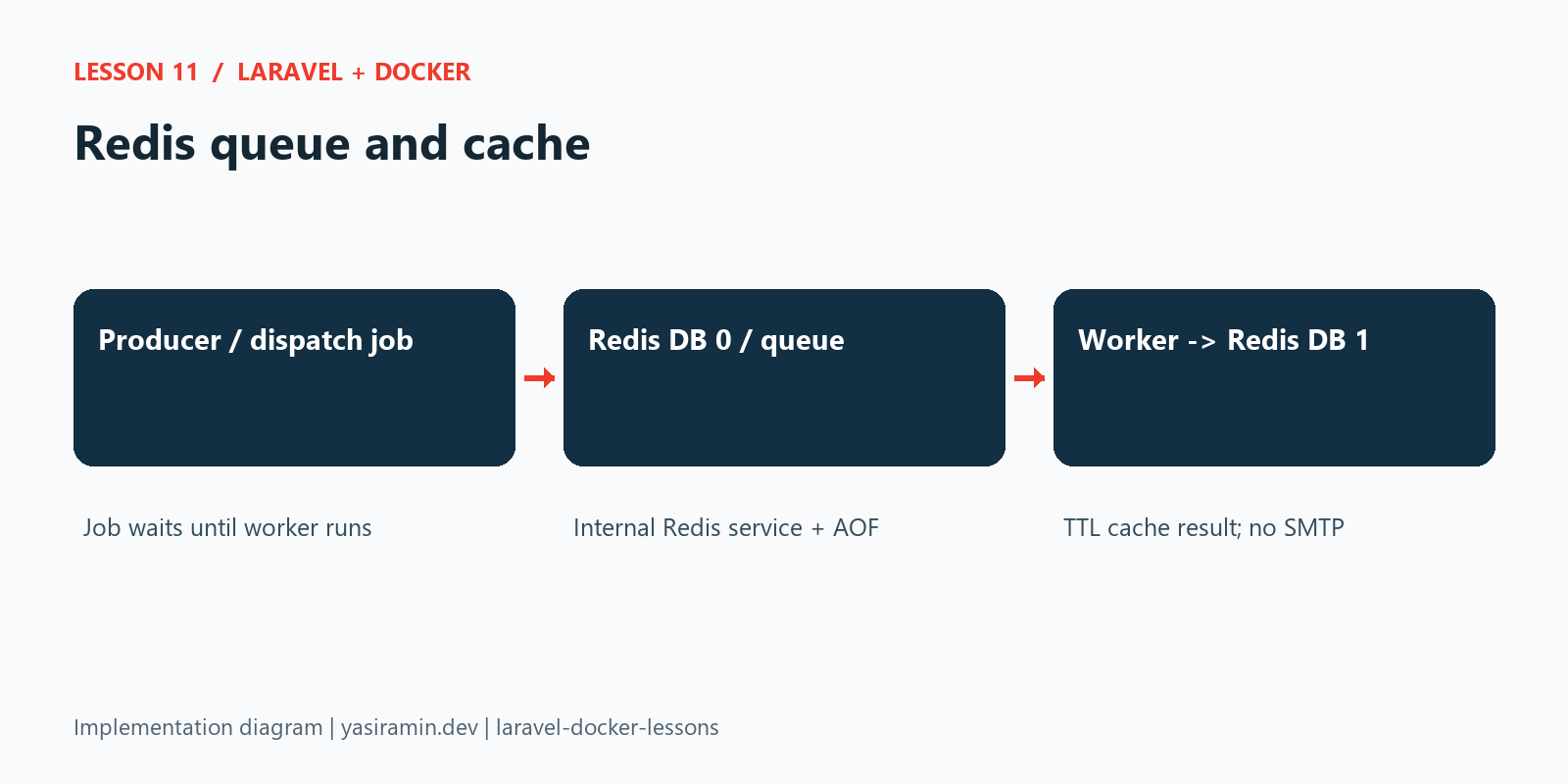
Laravel's existing config/database.php, config/cache.php and config/queue.php already support these environment names. Queue data uses Redis logical database 0; cached results use database 1. They share a Redis server, so this separates key spaces but does not isolate memory, CPU or failure. Never use FLUSHALL to clear a demonstration cache.
Start with the worker stopped
Use a prepared application .env and key. Stop the previous selected stack, keeping named volumes. Use both Compose files consistently:
docker compose -f docker-compose.yaml -f docker-compose.redis.yaml config --quiet
docker compose -f docker-compose.yaml -f docker-compose.redis.yaml up -d --build --renew-anon-volumes db redis web nginx
docker compose -f docker-compose.yaml -f docker-compose.redis.yaml exec web php artisan config:clear
docker compose -f docker-compose.yaml -f docker-compose.redis.yaml exec web php artisan migrate --force
docker compose -f docker-compose.yaml -f docker-compose.redis.yaml exec redis redis-cli ping
docker compose -f docker-compose.yaml -f docker-compose.redis.yaml --profile queue stop worker
Redis should answer PONG. The normal startup does not enable the queue profile. Before queuing, check the queue is dedicated to this tutorial; starting the worker can process jobs left from a previous demo.
Dispatch a real Redis job
docker compose -f docker-compose.yaml -f docker-compose.redis.yaml exec web php artisan demo:redis-queueThe command generates a unique reference and key, dispatches StoreRedisDemoResult explicitly on the redis connection and demos queue, then prints a follow-up command. Copy the actual key from its output:
docker compose -f docker-compose.yaml -f docker-compose.redis.yaml exec web php artisan demo:redis-queue --read=lesson11:YOUR_REFERENCEWith the worker stopped, expect a pending-or-expired message. Dispatching a job is not the same as completing it. The job's handler writes its result with a ten-minute TTL using Cache::store('redis'). The command validates keys before reading and does not scan or flush other cache data.
Start the Docker worker
docker compose -f docker-compose.yaml -f docker-compose.redis.yaml --profile queue up -d --build --renew-anon-volumes worker
docker compose -f docker-compose.yaml -f docker-compose.redis.yaml logs --tail=30 worker
docker compose -f docker-compose.yaml -f docker-compose.redis.yaml exec web php artisan demo:redis-queue --read=lesson11:YOUR_REFERENCE
The worker runs queue:work redis --queue=demos,emails, with three attempts, a 30-second timeout, one-second polling and recycling after an hour. Its timeout is shorter than the 90-second retry interval. With the same printed key, the read command now shows the processed result. After ten minutes that cache entry expires, even though the job already completed; a missing result is not automatically a job failure.
Reuse the Mailtrap email example
Lesson 5's email job used a fixed database queue. This tag introduces config/demo.php and DEMO_QUEUE_CONNECTION, defaulting to database for compatibility. The Redis override selects redis, and the command prints the connection actually used. Both producer and worker must use the same override.
docker compose -f docker-compose.yaml -f docker-compose.redis.yaml exec web php artisan demo:queue-email student@example.com --name="Laravel Student"Configure your private Mailtrap Sandbox MAIL_HOST, MAIL_PORT, MAIL_USERNAME, MAIL_PASSWORD and MAIL_SCHEME values before using this optional command. The existing Mailable, HTML/text Blade templates and /queue-demo/mail-preview route are retained. SMTP delivery is a separate check in your Mailtrap inbox; the Redis cache demo sends no mail. Jobs already in MySQL are not automatically transferred to Redis.
Persistence, failures and cleanup
docker compose -f docker-compose.yaml -f docker-compose.redis.yaml exec web php artisan queue:failed
docker compose -f docker-compose.yaml -f docker-compose.redis.yaml stop worker
docker compose -f docker-compose.yaml -f docker-compose.redis.yaml --profile queue down
Keep volumes by omitting -v. AOF improves restart persistence but does not replace backups or make queue processing exactly once. Queue jobs should tolerate retries. StoreRedisDemoResult overwrites the same reference key on retry, so repeated handling does not create extra records. Do not run tutorial schedulers or workers when you are finished recording.
How the implementation fits together
Configuration and source code
The following files are read directly from this lesson’s Git tag. Later lessons add further capabilities; they do not change this snapshot.
Dockerfile
FROM php:8.2-fpm

WORKDIR /var/www/html

RUN apt-get update && apt-get install -y \
    libzip-dev \
    libpq-dev \
    unzip \
    && docker-php-ext-install zip pdo_mysql pdo_pgsql pcntl \
    && rm -rf /var/lib/apt/lists/*

RUN pecl install mongodb-1.21.2 \
    && docker-php-ext-enable mongodb

COPY --from=composer:2 /usr/bin/composer /usr/local/bin/composer
ENV COMPOSER_HOME=/tmp/composer

COPY --from=node:22-bookworm-slim /usr/local/bin/node /usr/local/bin/node
COPY --from=node:22-bookworm-slim /usr/local/lib/node_modules /usr/local/lib/node_modules
RUN ln -s ../lib/node_modules/npm/bin/npm-cli.js /usr/local/bin/npm \
    && ln -s ../lib/node_modules/npm/bin/npx-cli.js /usr/local/bin/npx \
    && node --version && npm --version
ENV NPM_CONFIG_CACHE=/tmp/npm-cache

RUN pecl install redis-6.3.0 \
    && docker-php-ext-enable redis

COPY --chown=www-data:www-data . /var/www/html

RUN COMPOSER_ALLOW_SUPERUSER=1 composer install --no-interaction --prefer-dist --optimize-autoloader \
    && mkdir -p node_modules \
    && chown -R www-data:www-data vendor storage bootstrap/cache node_modules /tmp/composer \
    && chmod -R 775 storage bootstrap/cache
config/demo.php
<?php

return [
    // Preserve Lesson 5 by default; the Lesson 11 Compose override selects Redis.
    'queue_connection' => env('DEMO_QUEUE_CONNECTION', 'database'),
];
app/Jobs/StoreRedisDemoResult.php
<?php

namespace App\Jobs;

use Illuminate\Contracts\Queue\ShouldQueue;
use Illuminate\Foundation\Queue\Queueable;
use Illuminate\Support\Facades\Cache;

class StoreRedisDemoResult implements ShouldQueue
{
    use Queueable;

    public int $tries = 3;

    public int $timeout = 30;

    public function __construct(public string $reference)
    {
        $this->onConnection('redis')->onQueue('demos');
    }

    public function handle(): void
    {
        Cache::store('redis')->put('lesson11:'.$this->reference, [
            'reference' => $this->reference,
            'processed_at' => now()->toIso8601String(),
        ], 600);
    }
}
app/Console/Commands/RedisQueueDemo.php
<?php

namespace App\Console\Commands;

use App\Jobs\StoreRedisDemoResult;
use Illuminate\Console\Command;
use Illuminate\Support\Facades\Cache;
use Illuminate\Support\Str;

class RedisQueueDemo extends Command
{
    protected $signature = 'demo:redis-queue {--read= : Read the exact lesson11 cache key printed after dispatch}';

    protected $description = 'Dispatch a Redis demo job or inspect its cached result without sending email';

    public function handle(): int
    {
        if ($this->option('read') !== null) {
            $key = $this->option('read');
            if (! preg_match('/^lesson11:[0-9A-HJKMNP-TV-Z]{26}$/D', $key)) {
                $this->error('Use the exact lesson11:ULID key printed by the dispatch command.');

                return self::FAILURE;
            }

            $result = Cache::store('redis')->get($key);
            $this->info($result === null ? 'Pending or expired: no cached result.' : json_encode($result, JSON_THROW_ON_ERROR));

            return self::SUCCESS;
        }

        $reference = (string) Str::ulid();
        StoreRedisDemoResult::dispatch($reference);
        $this->info('Queued on redis / demos. Cache key: lesson11:'.$reference);
        $this->line('php artisan demo:redis-queue --read=lesson11:'.$reference);

        return self::SUCCESS;
    }
}
app/Jobs/SendDemoEmail.php
<?php

namespace App\Jobs;

use App\Mail\QueueDemoMail;
use Illuminate\Contracts\Queue\ShouldQueue;
use Illuminate\Foundation\Queue\Queueable;
use Illuminate\Support\Facades\Mail;
use RuntimeException;

class SendDemoEmail implements ShouldQueue
{
    use Queueable;

    public int $tries = 3;

    public int $timeout = 30;

    public function __construct(
        public string $recipient,
        public string $recipientName,
        public string $reference,
    ) {
        $this->onConnection(config('demo.queue_connection', 'database'))->onQueue('emails')->afterCommit();
    }

    public function backoff(): array
    {
        return [10, 30];
    }

    public function handle(): void
    {
        if (blank(config('mail.mailers.mailtrap.username')) || blank(config('mail.mailers.mailtrap.password'))) {
            throw new RuntimeException('Configure MAIL_USERNAME and MAIL_PASSWORD with Mailtrap Sandbox SMTP credentials before processing demo emails.');
        }

        // The job is already queued; send the mailable here instead of queuing it a second time.
        Mail::mailer('mailtrap')->to($this->recipient)
            ->send(new QueueDemoMail($this->recipientName, $this->reference));
    }
}
app/Console/Commands/QueueDemoEmail.php
<?php

namespace App\Console\Commands;

use App\Jobs\SendDemoEmail;
use Illuminate\Console\Command;
use Illuminate\Support\Facades\Validator;
use Illuminate\Support\Str;

class QueueDemoEmail extends Command
{
    protected $signature = 'demo:queue-email {email=student@example.com : Test recipient captured by Mailtrap Sandbox} {--name=Laravel Developer : Name shown in the email}';

    protected $description = 'Queue one Lesson 5 email for the Mailtrap Sandbox';

    public function handle(): int
    {
        $input = ['email' => $this->argument('email'), 'name' => $this->option('name')];
        $validator = Validator::make($input, ['email' => 'required|email|max:254', 'name' => 'required|string|max:100']);

        if ($validator->fails()) {
            foreach ($validator->errors()->all() as $error) {
                $this->error($error);
            }

            return self::FAILURE;
        }

        if (blank(config('mail.mailers.mailtrap.username')) || blank(config('mail.mailers.mailtrap.password'))) {
            $this->error('Set MAIL_USERNAME and MAIL_PASSWORD to your Mailtrap Sandbox SMTP credentials in your private .env, then clear container config.');

            return self::FAILURE;
        }

        $reference = (string) Str::ulid();
        SendDemoEmail::dispatch($input['email'], $input['name'], $reference);

        $connection = config('demo.queue_connection', 'database');
        $this->info("Queued email {$reference} on {$connection} / emails for {$input['email']}.");
        $this->comment('Queued does not mean delivered. Start the Docker worker and check your Mailtrap Sandbox inbox.');

        return self::SUCCESS;
    }
}
.env.example
APP_NAME=Laravel
APP_ENV=local
APP_KEY=
APP_DEBUG=true
APP_URL=http://localhost

# Lesson 4: opt in only while recording/running the test-user example.
SCHEDULER_DEMO_ENABLED=false

APP_LOCALE=en
APP_FALLBACK_LOCALE=en
APP_FAKER_LOCALE=en_US

APP_MAINTENANCE_DRIVER=file
# APP_MAINTENANCE_STORE=database

# PHP_CLI_SERVER_WORKERS=4

BCRYPT_ROUNDS=12

LOG_CHANNEL=stack
LOG_STACK=single
LOG_DEPRECATIONS_CHANNEL=null
LOG_LEVEL=debug

DB_CONNECTION=sqlite
# DB_HOST=127.0.0.1
# DB_PORT=3306
# DB_DATABASE=laravel
# DB_USERNAME=root
# DB_PASSWORD=

# Lesson 7: optional MongoDB connection; SQL remains the default database.
MONGODB_URI=mongodb://127.0.0.1:27017
MONGODB_DATABASE=laravel_demo

SESSION_DRIVER=database
SESSION_LIFETIME=120
SESSION_ENCRYPT=false
SESSION_PATH=/
SESSION_DOMAIN=null

BROADCAST_CONNECTION=log
FILESYSTEM_DISK=local
QUEUE_CONNECTION=database
# Lesson 11: opt in to redis with docker-compose.redis.yaml; Lesson 5 stays database.
DEMO_QUEUE_CONNECTION=database

CACHE_STORE=database
# CACHE_PREFIX=

MEMCACHED_HOST=127.0.0.1

REDIS_CLIENT=phpredis
REDIS_HOST=127.0.0.1
REDIS_PASSWORD=null
REDIS_PORT=6379

MAIL_MAILER=log
MAIL_SCHEME=null
MAIL_HOST=127.0.0.1
MAIL_PORT=2525
MAIL_USERNAME=null
MAIL_PASSWORD=null
MAIL_FROM_ADDRESS="hello@example.com"
MAIL_FROM_NAME="${APP_NAME}"

# Lesson 5: copy these credentials from your Mailtrap Email Sandbox, not Email Sending.
# The queued demo explicitly uses the mailtrap mailer with the MAIL_* keys above.
# For Lesson 5, set MAIL_HOST=sandbox.smtp.mailtrap.io and private Sandbox credentials.

AWS_ACCESS_KEY_ID=
AWS_SECRET_ACCESS_KEY=
AWS_DEFAULT_REGION=us-east-1
AWS_BUCKET=
AWS_USE_PATH_STYLE_ENDPOINT=false

VITE_APP_NAME="${APP_NAME}"
resources/views/emails/queue-demo.blade.php
<!DOCTYPE html>
<html lang="en">
<head>
    <meta charset="utf-8">
    <meta name="viewport" content="width=device-width, initial-scale=1">
    <title>Lesson 5 · Queued Laravel Email</title>
</head>
<body style="margin:0;padding:0;background:#f3f6fa;color:#142c40;font-family:Arial,Helvetica,sans-serif;">
<table role="presentation" style="width:100%;border-collapse:collapse;background:#f3f6fa;">
    <tr><td style="padding:40px 16px;">
        <table role="presentation" style="width:100%;max-width:600px;margin:0 auto;border-collapse:collapse;background:#ffffff;border:1px solid #dce4ed;">
            <tr><td style="padding:32px 32px 20px;border-top:5px solid #ed352b;">
                <p style="margin:0 0 16px;color:#d72d24;font-size:12px;font-weight:bold;letter-spacing:2px;">LARAVEL + DOCKER · LESSON 5</p>
                <h1 style="margin:0;font-size:30px;line-height:1.2;">Your queue did the work.</h1>
            </td></tr>
            <tr><td style="padding:0 32px 28px;font-size:16px;line-height:1.7;">
                <p>Hello {{ $recipientName }},</p>
                <p>This message was created by a Laravel Mailable, rendered from a Blade template, and sent by a queued job running in a separate Docker worker.</p>
                <table role="presentation" style="width:100%;border-collapse:collapse;background:#edf3f8;">
                    <tr><td style="padding:18px;font-size:14px;line-height:1.8;">
                        <strong>1.</strong> Artisan dispatched the job.<br>
                        <strong>2.</strong> The queue backend stored it.<br>
                        <strong>3.</strong> The worker rendered and sent this email.
                    </td></tr>
                </table>
                <p style="margin-bottom:0;">Reference:<br><span style="font-family:monospace;font-size:13px;word-break:break-all;">{{ $reference }}</span></p>
            </td></tr>
            <tr><td style="padding:20px 32px;background:#142c40;color:#e5edf5;font-size:12px;line-height:1.7;">
                Laravel Docker Lessons · Queue Jobs Step by Step<br>
                This is a test message for the Mailtrap Email Sandbox.
            </td></tr>
        </table>
    </td></tr>
</table>
</body>
</html>
resources/views/emails/queue-demo-text.blade.php
Laravel + Docker — Lesson 5

Your queue did the work.

Hello {{ $recipientName }},

This message was created by a Laravel Mailable, rendered from a Blade template, and sent by a queued job running in a separate Docker worker.

1. Artisan dispatched the job.
2. The queue backend stored it.
3. The worker rendered and sent this email.

Reference: {{ $reference }}

This is a test message for the Mailtrap Email Sandbox.
Verification performed
The PHP image built with PHPRedis 6.3.0 and Redis answered PONG. A real job returned no cached result while the worker was stopped. Starting the isolated Docker worker processed the job successfully and wrote its matching reference into Redis logical database 1 with a measured 598-second remaining TTL. The worker was stopped afterward. All 26 automated tests passed inside Docker with 83 assertions, including Redis dispatch, input validation, cache expiration, repeat handling and Mailtrap connection selection. Mail delivery was faked in automated tests; no real email was sent during this verification.