


Laravel Docker Lessons · Lesson 9
Add Node.js 22 and npm to Laravel Docker, install locked frontend packages, compile Vite assets and view a working Tailwind and JavaScript demo.
This written tutorial follows the actual lesson-9 source snapshot. The written guide is ready before the video recording.
Continue from Lesson 8, or browse the complete blog.
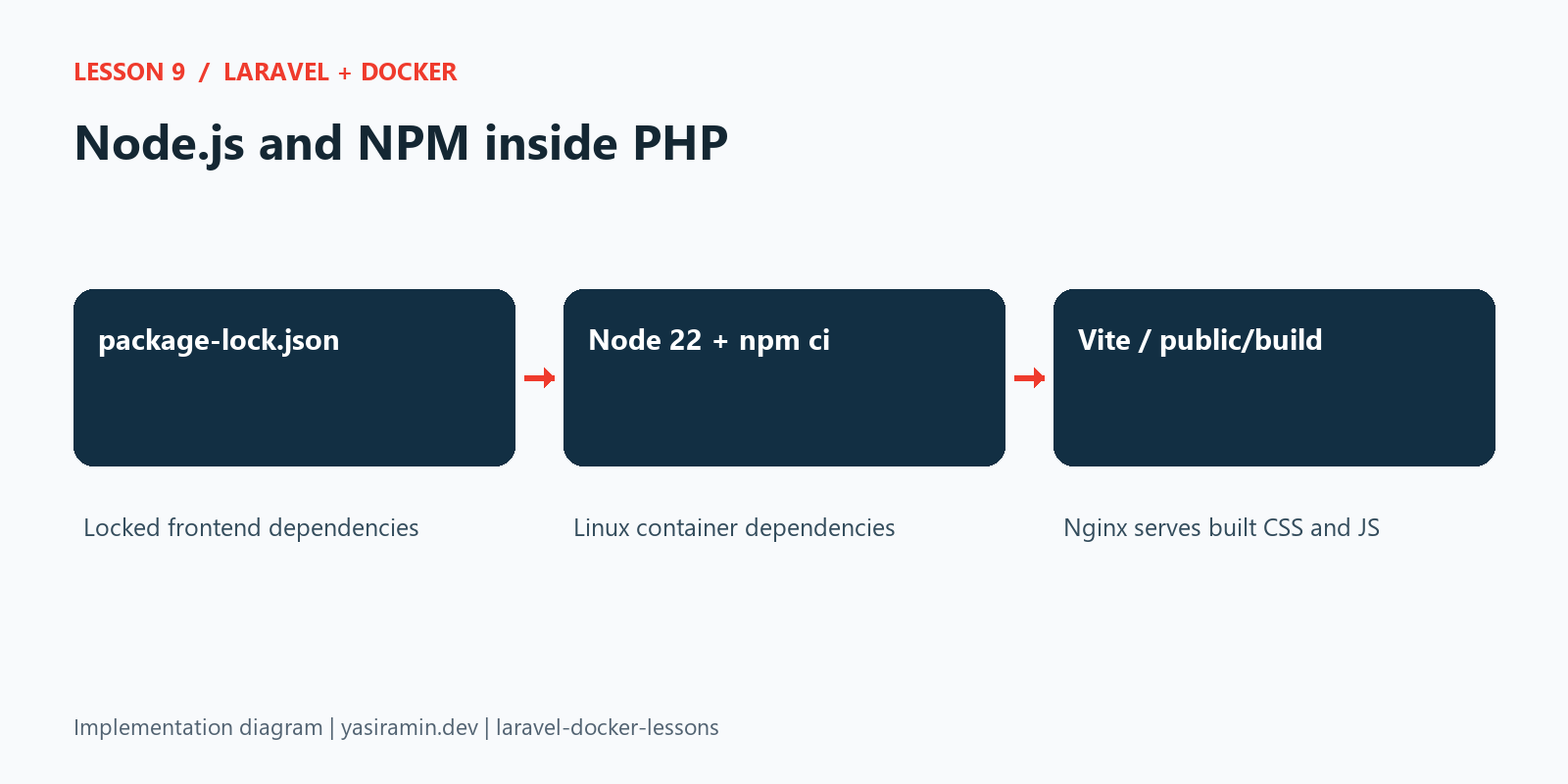
This lesson adds Node.js 22 and npm to the existing PHP container, alongside Composer from Lesson 8. We use them to install this project's locked frontend dependencies and build its real Vite assets. PHP-FPM continues to serve Laravel; Node is a build tool in this example and is not a new application server.
Complete file checklist before running commands
The complete Dockerfile, updated Compose volume list, route, Blade page and JavaScript entry are shown below. The CSS entry and Vite configuration are inherited Laravel files, but their complete code is also included so the frontend demonstration can be recreated. Keep package.json and obtain the matching package-lock.json from this tag. Do not copy Windows node_modules into the container.
| File | Action from the previous lesson | Exact source |
|---|---|---|
Dockerfile | Update the existing file; full code included | View complete file |
docker-compose.yaml | Update the existing file; full code included | View complete file |
resources/js/app.js | Update the existing file; full code included | View complete file |
resources/views/frontend-demo.blade.php | Create this file; full code included | View complete file |
routes/web.php | Update the existing file; full code included | View complete file |
.dockerignore | Keep the inherited file; inspect the exact snapshot | View complete file |
package.json | Keep the inherited file; inspect the exact snapshot | View complete file |
resources/css/app.css | Keep the inherited file; inspect the exact snapshot | View complete file |
vite.config.js | Keep the inherited file; inspect the exact snapshot | View complete file |
.docker/nginx/default.conf | Keep the inherited file; inspect the exact snapshot | View complete file |
Use the committed lock files from the same tag. They are download/source links rather than abbreviated code samples: composer.lock, package-lock.json.
Recording preparation and follow-up checks
After renewing the anonymous node_modules volume, run npm ci again before npm run build. Stop any old Vite development server and remove its stale public/hot pointer before a build-mode recording. Open /frontend-demo and click its button to confirm JavaScript is loaded.
Before recording, follow the recording checklist and PowerShell preflight. Current main excludes generated bootstrap config cache and public/hot from Docker build context. For historical tags, clear old host config cache before rebuilding and renew PHP runtime volumes so earlier database settings are not reused.
Add Node and npm to the PHP image
The Dockerfile copies the Node executable and npm modules from node:22-bookworm-slim. It creates npm and npx symlinks and sets NPM_CONFIG_CACHE=/tmp/npm-cache for www-data. Both donor and PHP images use Debian/glibc; an Alpine/musl binary would not be interchangeable. A build-time version check verifies the copied tools run.
Node 22 meets Vite 7's Node requirement in this project. The exact frontend package versions come from package-lock.json. The official Node tag tracks updates within version 22; inspect node --version to see the resolved patch version.
Build and recreate PHP
Use a prepared .env and application key from earlier lessons, or follow Lesson 8's fresh-checkout bootstrap first.
docker compose build web
docker compose up -d --renew-anon-volumes db web nginx
docker compose exec web node --version
docker compose exec web npm --version
docker compose exec web npm ci
docker compose exec web npm run build
docker compose exec web php artisan migrate --force
npm ci installs the committed lock file without rewriting it. The separate anonymous /var/www/html/node_modules volume prevents host Windows modules from being reused inside Linux. It also keeps container dependencies out of the source checkout. After recreating with --renew-anon-volumes, rerun npm ci because that module volume is fresh.
The public/build output lives in the source bind mount, so the separate Nginx container sees and serves the generated files. node_modules is not a web asset directory and is not served. On a Linux host, make the bind-mounted source writable by the container's www-data user; do not solve permissions by making all project files world-writable.
View the actual Vite demo
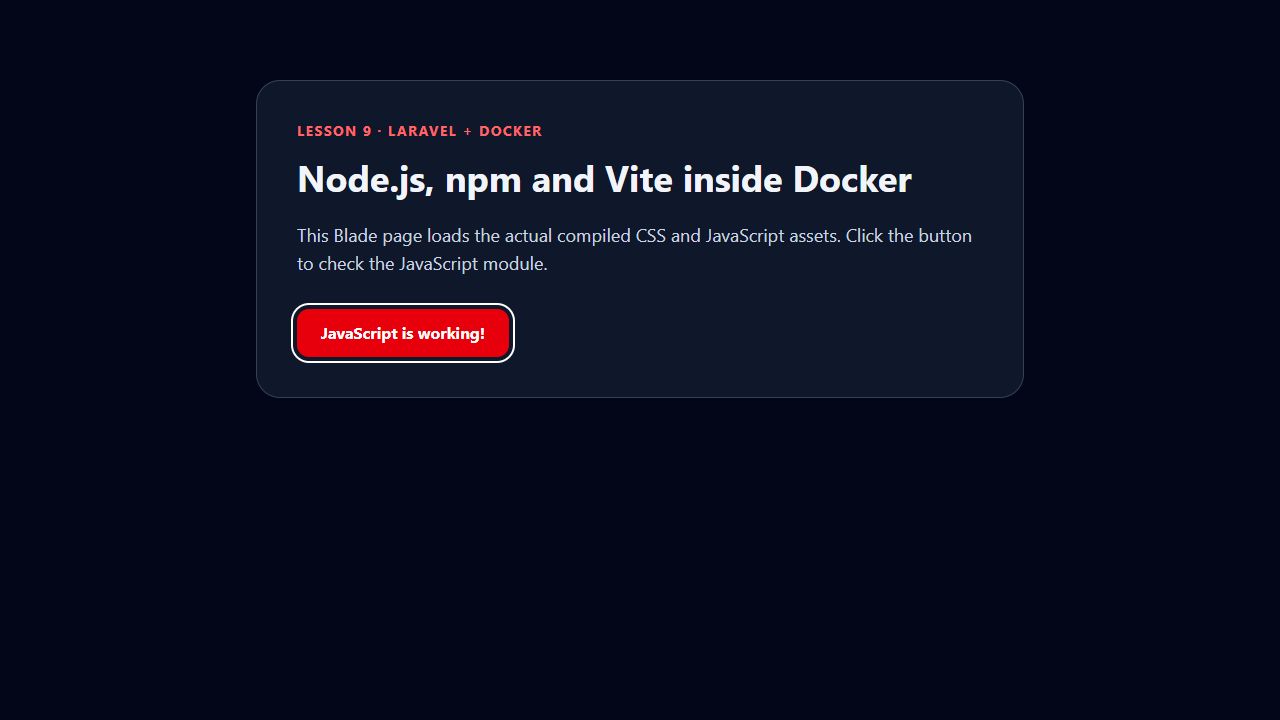
Open http://localhost:8080/frontend-demo or use your configured application port. routes/web.php renders frontend-demo.blade.php, which uses Laravel's @vite(['resources/css/app.css', 'resources/js/app.js']) directive. The page is styled with the project's Tailwind/Vite pipeline, and a button proves the JavaScript module loaded.
The app's existing entry module adds an event listener for the demo button. It does not require a framework or another dependency. In the browser, clicking the button changes its text to JavaScript is working!.
Build mode versus development mode
This lesson uses npm run build: static versioned assets, no Vite development server, and no additional port. If you previously ran npm run dev, stop it and remove a stale public/hot file before viewing build output. Otherwise Laravel may try to load assets from that old development server.
docker compose exec web node -e "console.log(require('fs').existsSync('public/build/manifest.json'))"
docker compose exec web npm ls --depth=0
docker compose down
The first command should print true after a successful build. Missing-manifest errors mean the build has not completed or the output is not visible to PHP/Nginx. Stop without -v to retain named database data. This container includes developer tooling for teaching; a separate production image can later copy only built assets.
How the implementation fits together
The working Vite Blade page
Configuration and source code
The following files are read directly from this lesson’s Git tag. Later lessons add further capabilities; they do not change this snapshot.
Dockerfile
FROM php:8.2-fpm

WORKDIR /var/www/html

RUN apt-get update && apt-get install -y \
    libzip-dev \
    libpq-dev \
    unzip \
    && docker-php-ext-install zip pdo_mysql pdo_pgsql pcntl \
    && rm -rf /var/lib/apt/lists/*

RUN pecl install mongodb-1.21.2 \
    && docker-php-ext-enable mongodb

COPY --from=composer:2 /usr/bin/composer /usr/local/bin/composer
ENV COMPOSER_HOME=/tmp/composer

COPY --from=node:22-bookworm-slim /usr/local/bin/node /usr/local/bin/node
COPY --from=node:22-bookworm-slim /usr/local/lib/node_modules /usr/local/lib/node_modules
RUN ln -s ../lib/node_modules/npm/bin/npm-cli.js /usr/local/bin/npm \
    && ln -s ../lib/node_modules/npm/bin/npx-cli.js /usr/local/bin/npx \
    && node --version && npm --version
ENV NPM_CONFIG_CACHE=/tmp/npm-cache

COPY --chown=www-data:www-data . /var/www/html

RUN COMPOSER_ALLOW_SUPERUSER=1 composer install --no-interaction --prefer-dist --optimize-autoloader \
    && mkdir -p node_modules \
    && chown -R www-data:www-data vendor storage bootstrap/cache node_modules /tmp/composer \
    && chmod -R 775 storage bootstrap/cache
docker-compose.yaml
x-laravel-environment: &laravel-environment
  DB_URL: ""
  DB_SOCKET: ""
  DB_CONNECTION: mysql
  DB_HOST: db
  DB_PORT: 3306
  DB_DATABASE: laravel_app
  DB_USERNAME: root
  DB_PASSWORD: root
  QUEUE_CONNECTION: database
  DB_QUEUE_RETRY_AFTER: 90

x-laravel-service: &laravel-service
  build:
    context: .
    dockerfile: Dockerfile
  image: my-laravel-app
  working_dir: /var/www/html
  user: "www-data"
  volumes:
    - .:/var/www/html
    - /var/www/html/vendor
    - /var/www/html/node_modules
    - /var/www/html/storage
    - /var/www/html/bootstrap/cache
  environment:
    <<: *laravel-environment
    SCHEDULER_DEMO_ENABLED: "false"
  depends_on:
    db:
      condition: service_healthy

services:
  web:
    <<: *laravel-service

  scheduler:
    <<: *laravel-service
    profiles: ["scheduler"]
    init: true
    command: ["php", "artisan", "schedule:work", "--no-interaction"]
    restart: unless-stopped
    environment:
      <<: *laravel-environment
      CACHE_STORE: file
      SCHEDULER_DEMO_ENABLED: "true"

  worker:
    <<: *laravel-service
    profiles: ["queue"]
    init: true
    command: ["php", "artisan", "queue:work", "database", "--queue=emails", "--sleep=1", "--tries=3", "--timeout=30", "--max-time=3600", "--no-interaction"]
    restart: unless-stopped
    stop_grace_period: 45s

  nginx:
    image: nginx:latest
    ports:
      - "${APP_PORT:-8080}:80"
    volumes:
      - .:/var/www/html:ro
      - ./.docker/nginx/default.conf:/etc/nginx/conf.d/default.conf:ro
    depends_on:
      - web

  db:
    image: mysql:8.0
    environment:
      MYSQL_ROOT_PASSWORD: root
      MYSQL_DATABASE: laravel_app
    ports:
      - "${DB_FORWARD_PORT:-3308}:3306"
    volumes:
      - dbdata:/var/lib/mysql
    healthcheck:
      test: ["CMD-SHELL", "mysqladmin ping -h 127.0.0.1 -p\"$${MYSQL_ROOT_PASSWORD}\" --silent"]
      interval: 5s
      timeout: 5s
      retries: 20
      start_period: 20s

volumes:
  dbdata:
package.json
{
    "$schema": "https://www.schemastore.org/package.json",
    "private": true,
    "type": "module",
    "scripts": {
        "build": "vite build",
        "dev": "vite"
    },
    "devDependencies": {
        "@tailwindcss/vite": "^4.0.0",
        "axios": "^1.11.0",
        "concurrently": "^9.0.1",
        "laravel-vite-plugin": "^2.0.0",
        "tailwindcss": "^4.0.0",
        "vite": "^7.0.7"
    }
}
routes/web.php
<?php

use App\Http\Controllers\SchedulerDemoController;
use App\Mail\QueueDemoMail;
use App\Models\MongoNote;
use Illuminate\Support\Facades\Route;

Route::get('/', function () {
    return view('welcome');
});

Route::get('/scheduler-demo', SchedulerDemoController::class)->name('scheduler-demo');

Route::get('/queue-demo/mail-preview', fn () => new QueueDemoMail('Laravel Developer', 'preview-only'))
    ->name('queue-demo.mail-preview');

Route::get('/mongo-demo', fn () => view('mongo-demo', [
    'notes' => MongoNote::orderByDesc('created_at')->limit(20)->get(),
]))->name('mongo-demo');

Route::view('/frontend-demo', 'frontend-demo')->name('frontend-demo');
resources/views/frontend-demo.blade.php
<!doctype html>
<html lang="en">
<head>
    <meta charset="utf-8">
    <meta name="viewport" content="width=device-width, initial-scale=1">
    <title>Lesson 9 · Node, npm and Vite</title>
    @vite(['resources/css/app.css', 'resources/js/app.js'])
</head>
<body class="min-h-screen bg-slate-950 px-6 py-20 font-sans text-slate-100">
    <main class="mx-auto max-w-3xl rounded-3xl border border-slate-700 bg-slate-900 p-10">
        <p class="mb-4 text-sm font-bold tracking-widest text-red-400">LESSON 9 · LARAVEL + DOCKER</p>
        <h1 class="mb-6 text-4xl font-bold">Node.js, npm and Vite inside Docker</h1>
        <p class="mb-8 text-lg text-slate-300">This Blade page loads the actual compiled CSS and JavaScript assets. Click the button to check the JavaScript module.</p>
        <button id="frontend-demo-button" type="button" class="cursor-pointer rounded-xl bg-red-500 px-6 py-3 font-bold text-white hover:bg-red-600 focus:outline-2 focus:outline-offset-4 focus:outline-white">Test JavaScript</button>
    </main>
</body>
</html>
resources/js/app.js
import './bootstrap';

document.querySelector('#frontend-demo-button')?.addEventListener('click', (event) => {
    event.currentTarget.textContent = 'JavaScript is working!';
});
resources/css/app.css
@import 'tailwindcss';

@source '../../vendor/laravel/framework/src/Illuminate/Pagination/resources/views/*.blade.php';
@source '../../storage/framework/views/*.php';
@source '../**/*.blade.php';
@source '../**/*.js';

@theme {
    --font-sans: 'Instrument Sans', ui-sans-serif, system-ui, sans-serif, 'Apple Color Emoji', 'Segoe UI Emoji',
        'Segoe UI Symbol', 'Noto Color Emoji';
}
vite.config.js
import { defineConfig } from 'vite';
import laravel from 'laravel-vite-plugin';
import tailwindcss from '@tailwindcss/vite';

export default defineConfig({
    plugins: [
        laravel({
            input: ['resources/css/app.css', 'resources/js/app.js'],
            refresh: true,
        }),
        tailwindcss(),
    ],
    server: {
        watch: {
            ignored: ['**/storage/framework/views/**'],
        },
    },
});
Verification performed
The container ran Node.js 22.23.3 and npm 10.9.9. With a fresh www-data-owned node_modules volume, npm ci installed 91 packages and reported zero audit vulnerabilities at verification time. Vite 7.3.7 compiled 58 modules and produced a manifest, CSS and JavaScript. The Blade route returned HTTP 200, and a browser click changed the button to JavaScript is working!. The focused Blade test passed with three assertions.