


Laravel Docker Lessons · Lesson 6
Connect Laravel 12 to PostgreSQL 17 using Docker Compose, PDO pgsql, health checks, persistent storage, migrations and a real users Blade demo.
This written tutorial follows the actual lesson-6 source snapshot. The written guide is ready before the video recording.
Continue from Lesson 5, or browse the complete blog.
This lesson adds an optional PostgreSQL 17 stack to the existing Laravel 12 / PHP 8.2-FPM / Nginx project. The normal docker-compose.yaml still uses MySQL. Select the standalone docker-compose.postgres.yaml file for this lesson; do not merge it with the MySQL file.
Recording preparation and follow-up checks
Use PHP 8.2+ for host Composer. Check the PHP executable selected by your recording terminal. After switching back from a newer lesson, run composer install against this tag's own lock file. Keep the PostgreSQL Compose file standalone and use it on every command.
php -v
composer install
npm ci
npm run build
Before recording, follow the recording checklist and PowerShell preflight. Current main excludes generated bootstrap config cache and public/hot from Docker build context. For historical tags, clear old host config cache before rebuilding and renew PHP runtime volumes so earlier database settings are not reused.
What changes
Dockerfileinstallslibpq-devandpdo_pgsql, retaining the MySQL and PCNTL extensions.docker-compose.postgres.yamlreuses the existing PHP, Nginx, worker and scheduler service definitions through Composeextendsand replaces the database withpostgres:17-alpine.- PostgreSQL stores its data in the separate
pgdatavolume. Existing MySQLdbdatais not converted or deleted. demo:database-checkopens the selected SQL connection, executesSELECT 1and counts migrated users. It does not create or remove data.
Prepare the project
Check out the lesson-6 tag into a clean checkout. Run composer install and npm ci && npm run build on the host, as in the earlier lessons. Copy .env.example to .env only for a fresh checkout and generate the application key. Preserve an existing environment file and key.
The PostgreSQL Compose file passes these settings to PHP containers:
DB_CONNECTION=pgsql
DB_HOST=db
DB_PORT=5432
DB_DATABASE=laravel_app
DB_USERNAME=laravel
DB_PASSWORD=local-postgres-password
These are local tutorial credentials, not a production secret. Container environment settings override the host .env SQL settings; DB_URL and DB_SOCKET are cleared to avoid accidentally using another database. config/database.php already contains Laravel's pgsql connection, so no replacement config file or additional database package is required. Do not print a real environment file in your recording.
Create both Compose files before running commands
There are two separate files in the project root. Keep the existing docker-compose.yaml as the base PHP/Nginx/MySQL setup and create a new sibling file named exactly docker-compose.postgres.yaml. Do not paste the PostgreSQL file over the base file: its extends entries read service definitions from that base file, so replacing it creates a circular reference. The PostgreSQL file is selected alone on the command line, while Compose reads the base internally through extends.
If following along manually from Lesson 5, add the PostgreSQL file below and the PDO PostgreSQL Dockerfile changes. If using Git, obtain the complete lesson-6 snapshot. A folder copied for a previous recording does not acquire the new file automatically. Verify the actual filenames before starting:
Get-Item .\docker-compose.yaml, .\docker-compose.postgres.yamlBase file: docker-compose.yaml
This is the complete base file from the lesson-6 tag. The base intentionally retains MySQL; the new PostgreSQL file replaces the selected database service and PHP database environment. The optional scheduler and worker remain behind their profiles.
x-laravel-environment: &laravel-environment
  DB_URL: ""
  DB_SOCKET: ""
  DB_CONNECTION: mysql
  DB_HOST: db
  DB_PORT: 3306
  DB_DATABASE: laravel_app
  DB_USERNAME: root
  DB_PASSWORD: root
  QUEUE_CONNECTION: database
  DB_QUEUE_RETRY_AFTER: 90

x-laravel-service: &laravel-service
  build:
    context: .
    dockerfile: Dockerfile
  image: my-laravel-app
  working_dir: /var/www/html
  user: "www-data"
  volumes:
    - .:/var/www/html
    - /var/www/html/vendor
    - /var/www/html/storage
    - /var/www/html/bootstrap/cache
  environment:
    <<: *laravel-environment
    SCHEDULER_DEMO_ENABLED: "false"
  depends_on:
    db:
      condition: service_healthy

services:
  web:
    <<: *laravel-service

  scheduler:
    <<: *laravel-service
    profiles: ["scheduler"]
    init: true
    command: ["php", "artisan", "schedule:work", "--no-interaction"]
    restart: unless-stopped
    environment:
      <<: *laravel-environment
      CACHE_STORE: file
      SCHEDULER_DEMO_ENABLED: "true"

  worker:
    <<: *laravel-service
    profiles: ["queue"]
    init: true
    command: ["php", "artisan", "queue:work", "database", "--queue=emails", "--sleep=1", "--tries=3", "--timeout=30", "--max-time=3600", "--no-interaction"]
    restart: unless-stopped
    stop_grace_period: 45s

  nginx:
    image: nginx:latest
    ports:
      - "${APP_PORT:-8080}:80"
    volumes:
      - .:/var/www/html:ro
      - ./.docker/nginx/default.conf:/etc/nginx/conf.d/default.conf:ro
    depends_on:
      - web

  db:
    image: mysql:8.0
    environment:
      MYSQL_ROOT_PASSWORD: root
      MYSQL_DATABASE: laravel_app
    ports:
      - "${DB_FORWARD_PORT:-3308}:3306"
    volumes:
      - dbdata:/var/lib/mysql
    healthcheck:
      test: ["CMD-SHELL", "mysqladmin ping -h 127.0.0.1 -p\"$${MYSQL_ROOT_PASSWORD}\" --silent"]
      interval: 5s
      timeout: 5s
      retries: 20
      start_period: 20s

volumes:
  dbdata:
New file: docker-compose.postgres.yaml
Create this file next to the base file, not inside .docker. It reuses the base services, supplies PostgreSQL environment settings to PHP, and defines the PostgreSQL container, health check, forwarded port and separate persistent volume.
# Standalone alternative: docker compose -f docker-compose.postgres.yaml up -d --build
x-postgres-environment: &postgres-environment
  DB_URL: ""
  DB_SOCKET: ""
  DB_CONNECTION: pgsql
  DB_HOST: db
  DB_PORT: 5432
  DB_DATABASE: laravel_app
  DB_USERNAME: laravel
  DB_PASSWORD: local-postgres-password

services:
  web:
    extends:
      file: docker-compose.yaml
      service: web
    environment: *postgres-environment

  worker:
    extends:
      file: docker-compose.yaml
      service: worker
    environment: *postgres-environment

  scheduler:
    extends:
      file: docker-compose.yaml
      service: scheduler
    environment: *postgres-environment

  nginx:
    extends:
      file: docker-compose.yaml
      service: nginx

  db:
    image: postgres:17-alpine
    environment:
      POSTGRES_DB: laravel_app
      POSTGRES_USER: laravel
      POSTGRES_PASSWORD: local-postgres-password
    ports:
      - "127.0.0.1:${POSTGRES_FORWARD_PORT:-5433}:5432"
    volumes:
      - pgdata:/var/lib/postgresql/data
    healthcheck:
      test: ["CMD-SHELL", "pg_isready -U \"$${POSTGRES_USER}\" -d \"$${POSTGRES_DB}\""]
      interval: 5s
      timeout: 5s
      retries: 20
      start_period: 10s

volumes:
  pgdata:
These credentials belong to the local tutorial. The standalone PostgreSQL selection does not start the base MySQL service. Keep using -f docker-compose.postgres.yaml for startup, migrations, inspection and shutdown.
Start PostgreSQL, PHP and Nginx
Stop the previous tutorial stack first if it uses the same application port. Keep its volumes:
docker compose down
docker compose -f docker-compose.postgres.yaml config --quiet
docker compose -f docker-compose.postgres.yaml up -d --build db web nginx
docker compose -f docker-compose.postgres.yaml exec web php artisan config:clear
docker compose -f docker-compose.postgres.yaml exec web php artisan migrate --force
docker compose -f docker-compose.postgres.yaml exec web php artisan demo:database-check pgsql
Expect Connected using pgsql. and the current user count. PHP talks to db:5432 on the Compose network. A host database client uses 127.0.0.1:5433; set POSTGRES_FORWARD_PORT to change that host port. The Nginx page uses http://localhost:8080, or your APP_PORT value. Never use the forwarded host port for a container-to-container database connection.
The pg_isready health check gates PHP startup. It checks server readiness; the Artisan command separately verifies Laravel's authenticated connection and migrated schema. A running database container does not prove migrations have run.
Reuse the users demo
docker compose -f docker-compose.postgres.yaml exec -e SCHEDULER_DEMO_ENABLED=true web php artisan demo:create-userOpen /scheduler-demo to see that synthetic user backed by PostgreSQL. Its route, controller and Blade page are carried forward from Lesson 4. This lesson does not introduce a write-on-GET route or start the scheduler automatically. The optional queue and scheduler profiles are retained; use this same -f argument for every command when working with PostgreSQL.
Persistence, troubleshooting and stopping
docker compose -f docker-compose.postgres.yaml exec db psql -U laravel -d laravel_app -c "SELECT id, name, email FROM users ORDER BY id DESC LIMIT 5;"
docker compose -f docker-compose.postgres.yaml logs --tail=30 db
docker compose -f docker-compose.postgres.yaml --profile queue --profile scheduler down
Do not append -v if you want to keep data. PostgreSQL initialization credentials apply to an empty data directory; changing the Compose password does not update a pre-existing database role. A missing driver means the PHP image needs rebuilding. An absent users table means migrations have not run against this selected database. This is a local development example with HTTP and local credentials, not a production hardening guide.
How the implementation fits together
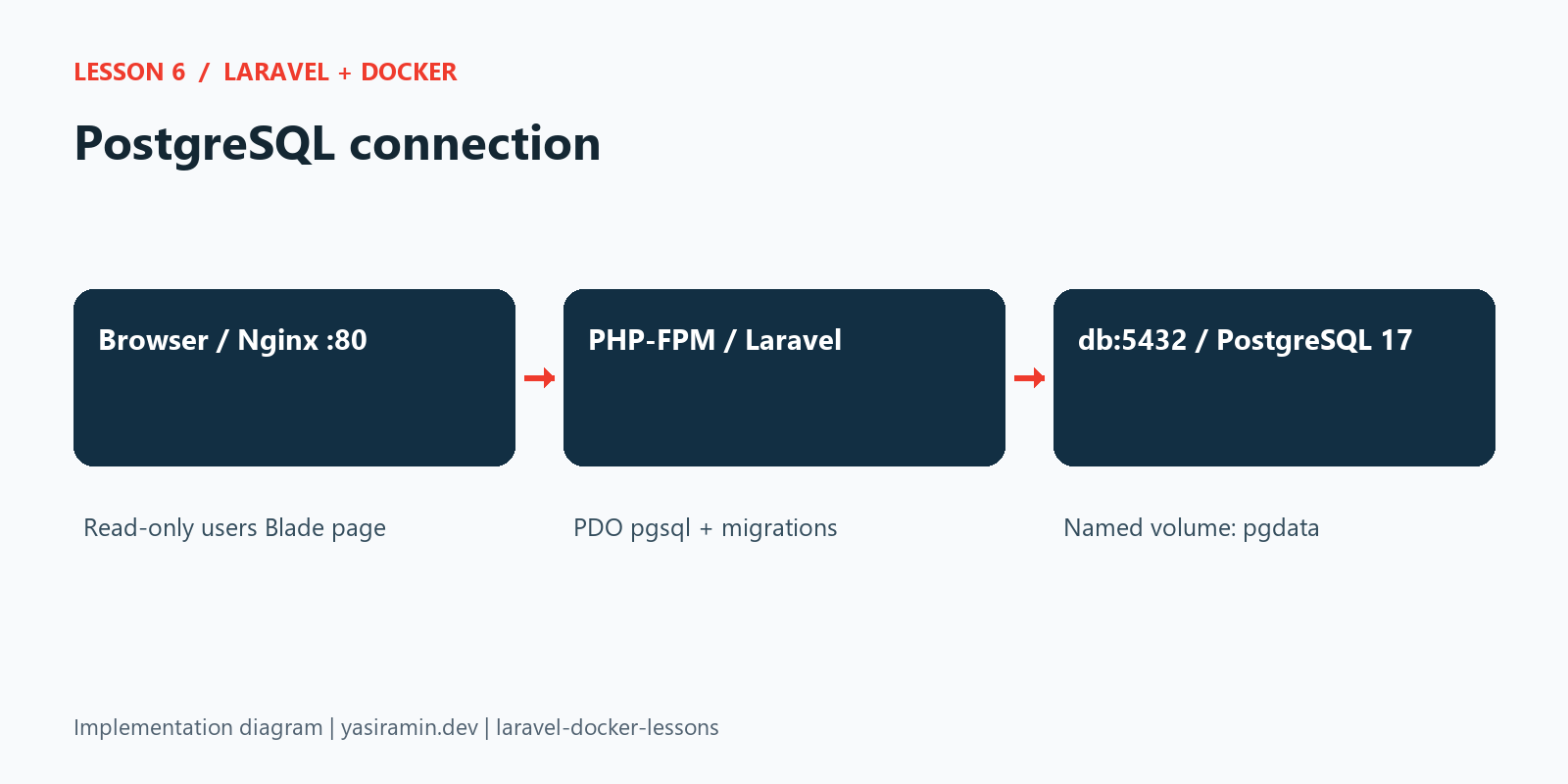
Configuration and source code
The following files are read directly from this lesson’s Git tag. Later lessons add further capabilities; they do not change this snapshot.
Dockerfile
FROM php:8.2-fpm

WORKDIR /var/www/html

RUN apt-get update && apt-get install -y \
    libzip-dev \
    libpq-dev \
    unzip \
    && docker-php-ext-install zip pdo_mysql pdo_pgsql pcntl \
    && rm -rf /var/lib/apt/lists/*

COPY --chown=www-data:www-data . /var/www/html

RUN chmod -R 775 /var/www/html/storage /var/www/html/bootstrap/cache
docker-compose.postgres.yaml
# Standalone alternative: docker compose -f docker-compose.postgres.yaml up -d --build
x-postgres-environment: &postgres-environment
  DB_URL: ""
  DB_SOCKET: ""
  DB_CONNECTION: pgsql
  DB_HOST: db
  DB_PORT: 5432
  DB_DATABASE: laravel_app
  DB_USERNAME: laravel
  DB_PASSWORD: local-postgres-password

services:
  web:
    extends:
      file: docker-compose.yaml
      service: web
    environment: *postgres-environment

  worker:
    extends:
      file: docker-compose.yaml
      service: worker
    environment: *postgres-environment

  scheduler:
    extends:
      file: docker-compose.yaml
      service: scheduler
    environment: *postgres-environment

  nginx:
    extends:
      file: docker-compose.yaml
      service: nginx

  db:
    image: postgres:17-alpine
    environment:
      POSTGRES_DB: laravel_app
      POSTGRES_USER: laravel
      POSTGRES_PASSWORD: local-postgres-password
    ports:
      - "127.0.0.1:${POSTGRES_FORWARD_PORT:-5433}:5432"
    volumes:
      - pgdata:/var/lib/postgresql/data
    healthcheck:
      test: ["CMD-SHELL", "pg_isready -U \"$${POSTGRES_USER}\" -d \"$${POSTGRES_DB}\""]
      interval: 5s
      timeout: 5s
      retries: 20
      start_period: 10s

volumes:
  pgdata:
app/Console/Commands/CheckDemoDatabase.php
<?php

namespace App\Console\Commands;

use Illuminate\Console\Command;
use Illuminate\Support\Facades\DB;

class CheckDemoDatabase extends Command
{
    protected $signature = 'demo:database-check {connection? : SQL connection name; defaults to the configured connection}';

    protected $description = 'Check the tutorial SQL connection and count migrated users without changing data';

    public function handle(): int
    {
        $name = $this->argument('connection') ?? config('database.default');

        if (! in_array(config("database.connections.{$name}.driver"), ['mysql', 'pgsql', 'sqlite'], true)) {
            $this->error('Choose a configured MySQL, PostgreSQL or SQLite connection.');

            return self::FAILURE;
        }

        $connection = DB::connection($name);
        $connection->select('SELECT 1');
        $this->info('Connected using '.$connection->getDriverName().'.');
        $this->line('Migrated users: '.$connection->table('users')->count());

        return self::SUCCESS;
    }
}
Verification performed
The PostgreSQL PHP image built successfully. An isolated PostgreSQL 17 stack passed its health check, ran all four migrations and returned a successful authenticated pgsql connection check. One synthetic user was inserted and the /scheduler-demo Blade page returned HTTP 200. Two focused automated tests passed with four assertions.