


Laravel Docker Lessons · Lesson 5
Learn Laravel queue jobs step by step with a practical email example. Queue a message in MySQL, process it in a separate Docker worker, render HTML and plain-text Blade templates, and configure Mailtrap Email Sandbox for safe email testing.
This article documents the actual lesson-5 source snapshot. It builds on Lesson 4: Laravel Scheduler and Cron Jobs with Docker. The recorded Urdu walkthrough is now available: watch Lesson 5 on YouTube.
Builds on lesson-4. This lesson demonstrates a database queue with one email: an Artisan command dispatches a job, a separate Docker worker handles it, and a Mailable renders HTML/text Blade views for the Mailtrap Email Sandbox.
The files and their responsibilities
| File | Responsibility |
|---|---|
app/Console/Commands/QueueDemoEmail.php | Validate the recipient/name and queue one job. Print a reference, without claiming delivery. |
app/Jobs/SendDemoEmail.php | Implement ShouldQueue, select the database connection and emails queue, and send the Mailable when handled. |
app/Mail/QueueDemoMail.php | Define the email subject and Blade views. It is not another queued job. |
resources/views/emails/queue-demo.blade.php | Render the HTML email using escaped Blade values and inline email styles. |
resources/views/emails/queue-demo-text.blade.php | Render the plain-text alternative. |
config/mail.php | Configure the named mailtrap SMTP mailer. |
routes/web.php | Register the read-only Blade email preview route. Queue dispatch stays in the Artisan command. |
docker-compose.yaml | Run the optional worker service separately from Nginx, PHP-FPM and the scheduler. |
Dockerfile | Include pcntl for the Linux queue worker's process signals and timeouts. |
The existing Laravel migration already creates jobs, job_batches and failed_jobs. No duplicate queue-table migration is necessary.
Understand the flow before running it
demo:queue-email
      |
      v
MySQL jobs table (queue = emails)
      |
      v
Docker worker: queue:work database --queue=emails
      |
      v
SendDemoEmail::handle()
      |
      v
QueueDemoMail + Blade views
      |
      v
Mailtrap Email Sandbox SMTP
The producer does not wait for SMTP. It stores the job and returns. Without a worker, the email remains queued. The job explicitly uses the database connection, so a private .env setting of QUEUE_CONNECTION=sync cannot accidentally turn this particular example into an inline send.
afterCommit() defers dispatch until an enclosing database transaction commits. If there is no enclosing transaction, dispatch proceeds immediately. The worker calls send() on the Mailable because the enclosing job is already queued; queueing the Mailable again would add a second queue hop.
1. Prepare the Laravel Docker stack
Use PHP 8.2+ on the host for Composer and the Laravel setup. For a fresh checkout, follow Lesson 4's setup to prepare .env, dependencies and the application key. Do not overwrite an existing .env or regenerate an existing key.
composer install
docker compose --profile queue config --quiet
docker compose up -d --build db web nginx
docker compose exec web php artisan config:clear
docker compose exec web php artisan migrate --force
docker compose restart nginx
The PHP image now installs zip, pdo_mysql and pcntl. The existing MySQL connection, named dbdata volume and configurable host ports are retained. The Compose environment explicitly selects the database queue and a 90-second database retry interval. No Redis service is introduced.
Composer files are copied into the built image and then used to populate each PHP service's anonymous vendor volume, as in Lesson 4. If dependencies change, rebuild and recreate the stack as described in that lesson so the volume does not retain an old dependency tree.
2. Add your Mailtrap Email Sandbox credentials
In Mailtrap, open Email Sandbox, choose your sandbox/inbox, then view its Integration SMTP settings. Use the sandbox SMTP username and password. These are not the Email Sending credentials, an account login password, or an API token.
Put these values only in your private .env:
MAIL_MAILER=log
MAIL_SCHEME=null
MAIL_HOST=sandbox.smtp.mailtrap.io
MAIL_PORT=2525
MAIL_USERNAME=your_sandbox_smtp_username
MAIL_PASSWORD=your_sandbox_smtp_password
MAIL_FROM_ADDRESS=hello@example.com
MAIL_FROM_NAME="Laravel Docker Lessons"
Existing environment keys: use the existing MAIL_HOST, MAIL_PORT, MAIL_USERNAME, MAIL_PASSWORD and MAIL_SCHEME keys. Set MAIL_HOST=sandbox.smtp.mailtrap.io instead of the generic localhost default. Copy only your own Sandbox SMTP username/password into your private environment file. The corrected named mailtrap mailer reads these same keys; its complete configuration is shown below. MAIL_MAILER=log can stay as the default because the job explicitly selects Mail::mailer('mailtrap'). No private credential values are published here.
The committed .env.example leaves credentials empty. The mailtrap mailer uses sandbox.smtp.mailtrap.io, a ten-second SMTP timeout and required TLS. Port 2525 is the documented default; use the port shown in your Mailtrap integration settings if needed. Do not disable certificate checks.
The default MAIL_MAILER=log is left unchanged. This example explicitly selects Mail::mailer('mailtrap'), so changing the default mailer is not necessary. The command refuses to enqueue if sandbox credentials are missing. The job checks again before processing, rather than reporting a log-file write as successful Mailtrap delivery.
After editing .env:
docker compose exec web php artisan config:clearIf the worker was already running, restart it after the environment/code change:
docker compose restart workerThe web and worker containers have separate anonymous cache/storage volumes. Restarting the worker is the explicit reload step in this example; clearing only the web container's config does not reload a running worker process. A fresh worker container starts with the current image's uncached configuration. If you previously cached config inside the worker, clear that worker cache as well before restarting it.
3. Preview the Blade email
The HTTP preview is registered in routes/web.php. Add the QueueDemoMail import and the route below to your existing file; import Route only once. The full route file is included in the implementation section. This route only renders the email. Queue dispatch uses demo:queue-email from the terminal; there is no HTTP send endpoint in this lesson.
use App\Mail\QueueDemoMail;
use Illuminate\Support\Facades\Route;

Route::get('/queue-demo/mail-preview', fn () => new QueueDemoMail('Laravel Developer', 'preview-only'))
    ->name('queue-demo.mail-preview');
Open http://localhost:8080/queue-demo/mail-preview, using your configured APP_PORT if different. This route renders the real Mailable with a fixed greeting and a preview-only reference. It neither queues a job nor connects to SMTP.
The message explains the three queue steps, displays the recipient's name, and includes a reference for matching the queued command to the captured sandbox message. Recipient names and references are escaped in both Blade templates. Previewing the HTML is not evidence of Mailtrap delivery.
4. Queue one email while the worker is stopped
docker compose stop worker
docker compose exec web php artisan demo:queue-email student@example.com --name="Laravel Student"
The command prints a reference and states that queued does not mean delivered. student@example.com is a synthetic test recipient: the sandbox captures the SMTP message for inspection rather than sending it to a real student inbox.
For a recording, inspect the pending row in MySQL:
docker compose exec db mysql -uroot -proot laravel_app -e "SELECT id, queue, attempts, reserved_at FROM jobs WHERE queue = 'emails';"These root credentials belong to the existing local tutorial stack; they are not production credentials. The payload contains the recipient, greeting and reference required to process the job. It does not contain the Mailtrap SMTP password.
5. Start the Docker queue worker
docker compose --profile queue up -d --build worker
docker compose logs -f worker
The service inherits the application image, source/vendor mounts, database environment and MySQL health dependency. Its command is:
php artisan queue:work database --queue=emails --sleep=1 --tries=3 --timeout=30 --max-time=3600 --no-interaction--queue=emails matches the job's queue; a worker listening only to default would not consume it. The worker runs in the foreground as www-data, uses an init process, has a 45-second graceful-stop allowance and restarts unless explicitly stopped. A periodic one-hour exit lets Docker restart the long-running process.
After a successful send, Laravel removes the job from the pending table. Open the selected Mailtrap sandbox and inspect the subject, HTML and text parts and command reference. A worker's successful SMTP submission means Mailtrap accepted the message; it is not proof of delivery to an external person's inbox.
The worker is behind the queue profile. Normal docker compose up -d does not start it. It is independent of Lesson 4's optional scheduler service; no scheduled email loop is added.
6. Retries, failures and worker restarts
The job allows three attempts, with ten seconds before the second attempt and thirty seconds before the third. Its timeout is 30 seconds, below the database reservation retry interval of 90 seconds, so an active worker is not normally overtaken by an expired reservation. The SMTP connection timeout is ten seconds. The Linux image includes pcntl so worker process signals/timeouts are supported.
docker compose exec web php artisan queue:failedIf a test job ultimately fails, fix its SMTP configuration, restart the worker, then retry that specific failed job with php artisan queue:retry and the failed job's UUID inside the web container. Do not retry every job blindly. SMTP queues provide at-least-once processing: if SMTP accepts a message and the process fails before acknowledging the job, a retry can produce another copy. This demo does not claim exactly-once email delivery.
When changing application code, restart the worker so it loads the new code. The source bind mount alone does not replace classes already loaded by a long-running process.
Stop after the demonstration
docker compose stop worker
docker compose --profile queue --profile scheduler ps -a
Stop the optional scheduler too if you started it during Lesson 4. To stop the entire stack while retaining MySQL data:
docker compose --profile queue --profile scheduler downDo not append -v when you want to keep the database. Pending jobs remain in MySQL while the worker is stopped and can be processed on the next deliberate worker start.
Verification and limits
php vendor/bin/pest
php vendor/bin/pint --test
docker compose --profile queue --profile scheduler config --quiet
The feature tests cover dispatch, the explicit database/emails destination, missing credentials, invalid input, Mailable rendering/escaping, the worker handler's named mailer, preview behavior and timeout/retry settings. Tests use faked mail delivery and do not contact Mailtrap.
Actual Mailtrap inbox delivery requires the owner's private sandbox credentials. Until that verification is performed, the setup is a configured integration, not a claim of a captured live Mailtrap message. Local database/worker verification can use an explicitly substituted in-memory test transport; that substitution is a test fixture, not the committed Mailtrap configuration.
Lesson 5 correction: the original lesson-5 tag used separate Mailtrap-prefixed environment variables. The route and mail examples below include the follow-up correction in commit 199f6d7, which reuses the project's existing MAIL_* keys. The original tag is retained as its historical snapshot.
The actual Lesson 5 implementation
routes/web.php
<?php

use App\Http\Controllers\SchedulerDemoController;
use App\Mail\QueueDemoMail;
use Illuminate\Support\Facades\Route;

Route::get('/', function () {
    return view('welcome');
});

Route::get('/scheduler-demo', SchedulerDemoController::class)->name('scheduler-demo');

Route::get('/queue-demo/mail-preview', fn () => new QueueDemoMail('Laravel Developer', 'preview-only'))
    ->name('queue-demo.mail-preview');
config/mail.php
<?php

return [

    /*
    |--------------------------------------------------------------------------
    | Default Mailer
    |--------------------------------------------------------------------------
    |
    | This option controls the default mailer that is used to send all email
    | messages unless another mailer is explicitly specified when sending
    | the message. All additional mailers can be configured within the
    | "mailers" array. Examples of each type of mailer are provided.
    |
    */

    'default' => env('MAIL_MAILER', 'log'),

    /*
    |--------------------------------------------------------------------------
    | Mailer Configurations
    |--------------------------------------------------------------------------
    |
    | Here you may configure all of the mailers used by your application plus
    | their respective settings. Several examples have been configured for
    | you and you are free to add your own as your application requires.
    |
    | Laravel supports a variety of mail "transport" drivers that can be used
    | when delivering an email. You may specify which one you're using for
    | your mailers below. You may also add additional mailers if needed.
    |
    | Supported: "smtp", "sendmail", "mailgun", "ses", "ses-v2",
    |            "postmark", "resend", "log", "array",
    |            "failover", "roundrobin"
    |
    */

    'mailers' => [

        'mailtrap' => [
            'transport' => 'smtp',
            'scheme' => env('MAIL_SCHEME'),
            'host' => env('MAIL_HOST', 'sandbox.smtp.mailtrap.io'),
            'port' => (int) env('MAIL_PORT', 2525),
            'username' => env('MAIL_USERNAME'),
            'password' => env('MAIL_PASSWORD'),
            'timeout' => 10,
            'require_tls' => true,
        ],

        'smtp' => [
            'transport' => 'smtp',
            'scheme' => env('MAIL_SCHEME'),
            'url' => env('MAIL_URL'),
            'host' => env('MAIL_HOST', '127.0.0.1'),
            'port' => env('MAIL_PORT', 2525),
            'username' => env('MAIL_USERNAME'),
            'password' => env('MAIL_PASSWORD'),
            'timeout' => null,
            'local_domain' => env('MAIL_EHLO_DOMAIN', parse_url((string) env('APP_URL', 'http://localhost'), PHP_URL_HOST)),
        ],

        'ses' => [
            'transport' => 'ses',
        ],

        'postmark' => [
            'transport' => 'postmark',
            // 'message_stream_id' => env('POSTMARK_MESSAGE_STREAM_ID'),
            // 'client' => [
            //     'timeout' => 5,
            // ],
        ],

        'resend' => [
            'transport' => 'resend',
        ],

        'sendmail' => [
            'transport' => 'sendmail',
            'path' => env('MAIL_SENDMAIL_PATH', '/usr/sbin/sendmail -bs -i'),
        ],

        'log' => [
            'transport' => 'log',
            'channel' => env('MAIL_LOG_CHANNEL'),
        ],

        'array' => [
            'transport' => 'array',
        ],

        'failover' => [
            'transport' => 'failover',
            'mailers' => [
                'smtp',
                'log',
            ],
            'retry_after' => 60,
        ],

        'roundrobin' => [
            'transport' => 'roundrobin',
            'mailers' => [
                'ses',
                'postmark',
            ],
            'retry_after' => 60,
        ],

    ],

    /*
    |--------------------------------------------------------------------------
    | Global "From" Address
    |--------------------------------------------------------------------------
    |
    | You may wish for all emails sent by your application to be sent from
    | the same address. Here you may specify a name and address that is
    | used globally for all emails that are sent by your application.
    |
    */

    'from' => [
        'address' => env('MAIL_FROM_ADDRESS', 'hello@example.com'),
        'name' => env('MAIL_FROM_NAME', env('APP_NAME', 'Laravel')),
    ],

];
The following files include the Lesson 5 mail-key correction linked above. The command produces the job; the job owns delivery; the Mailable owns the email content.
app/Console/Commands/QueueDemoEmail.php
<?php

namespace App\Console\Commands;

use App\Jobs\SendDemoEmail;
use Illuminate\Console\Command;
use Illuminate\Support\Facades\Validator;
use Illuminate\Support\Str;

class QueueDemoEmail extends Command
{
    protected $signature = 'demo:queue-email {email=student@example.com : Test recipient captured by Mailtrap Sandbox} {--name=Laravel Developer : Name shown in the email}';

    protected $description = 'Queue one Lesson 5 email for the Mailtrap Sandbox';

    public function handle(): int
    {
        $input = ['email' => $this->argument('email'), 'name' => $this->option('name')];
        $validator = Validator::make($input, ['email' => 'required|email|max:254', 'name' => 'required|string|max:100']);

        if ($validator->fails()) {
            foreach ($validator->errors()->all() as $error) {
                $this->error($error);
            }

            return self::FAILURE;
        }

        if (blank(config('mail.mailers.mailtrap.username')) || blank(config('mail.mailers.mailtrap.password'))) {
            $this->error('Set MAIL_USERNAME and MAIL_PASSWORD to your Mailtrap Sandbox SMTP credentials in your private .env, then clear container config.');

            return self::FAILURE;
        }

        $reference = (string) Str::ulid();
        SendDemoEmail::dispatch($input['email'], $input['name'], $reference);

        $this->info("Queued email {$reference} on database / emails for {$input['email']}.");
        $this->comment('Queued does not mean delivered. Start the Docker worker and check your Mailtrap Sandbox inbox.');

        return self::SUCCESS;
    }
}
app/Jobs/SendDemoEmail.php
<?php

namespace App\Jobs;

use App\Mail\QueueDemoMail;
use Illuminate\Contracts\Queue\ShouldQueue;
use Illuminate\Foundation\Queue\Queueable;
use Illuminate\Support\Facades\Mail;
use RuntimeException;

class SendDemoEmail implements ShouldQueue
{
    use Queueable;

    public int $tries = 3;

    public int $timeout = 30;

    public function __construct(
        public string $recipient,
        public string $recipientName,
        public string $reference,
    ) {
        $this->onConnection('database')->onQueue('emails')->afterCommit();
    }

    public function backoff(): array
    {
        return [10, 30];
    }

    public function handle(): void
    {
        if (blank(config('mail.mailers.mailtrap.username')) || blank(config('mail.mailers.mailtrap.password'))) {
            throw new RuntimeException('Configure MAIL_USERNAME and MAIL_PASSWORD with Mailtrap Sandbox SMTP credentials before processing demo emails.');
        }

        // The job is already queued; send the mailable here instead of queuing it a second time.
        Mail::mailer('mailtrap')->to($this->recipient)
            ->send(new QueueDemoMail($this->recipientName, $this->reference));
    }
}
app/Mail/QueueDemoMail.php
<?php

namespace App\Mail;

use Illuminate\Bus\Queueable;
use Illuminate\Mail\Mailable;
use Illuminate\Mail\Mailables\Content;
use Illuminate\Mail\Mailables\Envelope;
use Illuminate\Queue\SerializesModels;

class QueueDemoMail extends Mailable
{
    use Queueable, SerializesModels;

    public function __construct(public string $recipientName, public string $reference) {}

    public function envelope(): Envelope
    {
        return new Envelope(subject: 'Lesson 5: Your queued Laravel email is ready');
    }

    public function content(): Content
    {
        return new Content(view: 'emails.queue-demo', text: 'emails.queue-demo-text');
    }
}
resources/views/emails/queue-demo.blade.php
<!DOCTYPE html>
<html lang="en">
<head>
    <meta charset="utf-8">
    <meta name="viewport" content="width=device-width, initial-scale=1">
    <title>Lesson 5 · Queued Laravel Email</title>
</head>
<body style="margin:0;padding:0;background:#f3f6fa;color:#142c40;font-family:Arial,Helvetica,sans-serif;">
<table role="presentation" style="width:100%;border-collapse:collapse;background:#f3f6fa;">
    <tr><td style="padding:40px 16px;">
        <table role="presentation" style="width:100%;max-width:600px;margin:0 auto;border-collapse:collapse;background:#ffffff;border:1px solid #dce4ed;">
            <tr><td style="padding:32px 32px 20px;border-top:5px solid #ed352b;">
                <p style="margin:0 0 16px;color:#d72d24;font-size:12px;font-weight:bold;letter-spacing:2px;">LARAVEL + DOCKER · LESSON 5</p>
                <h1 style="margin:0;font-size:30px;line-height:1.2;">Your queue did the work.</h1>
            </td></tr>
            <tr><td style="padding:0 32px 28px;font-size:16px;line-height:1.7;">
                <p>Hello {{ $recipientName }},</p>
                <p>This message was created by a Laravel Mailable, rendered from a Blade template, and sent by a queued job running in a separate Docker worker.</p>
                <table role="presentation" style="width:100%;border-collapse:collapse;background:#edf3f8;">
                    <tr><td style="padding:18px;font-size:14px;line-height:1.8;">
                        <strong>1.</strong> Artisan dispatched the job.<br>
                        <strong>2.</strong> The database queue stored it.<br>
                        <strong>3.</strong> The worker rendered and sent this email.
                    </td></tr>
                </table>
                <p style="margin-bottom:0;">Reference:<br><span style="font-family:monospace;font-size:13px;word-break:break-all;">{{ $reference }}</span></p>
            </td></tr>
            <tr><td style="padding:20px 32px;background:#142c40;color:#e5edf5;font-size:12px;line-height:1.7;">
                Laravel Docker Lessons · Queue Jobs Step by Step<br>
                This is a test message for the Mailtrap Email Sandbox.
            </td></tr>
        </table>
    </td></tr>
</table>
</body>
</html>
resources/views/emails/queue-demo-text.blade.php
Laravel + Docker — Lesson 5

Your queue did the work.

Hello {{ $recipientName }},

This message was created by a Laravel Mailable, rendered from a Blade template, and sent by a queued job running in a separate Docker worker.

1. Artisan dispatched the job.
2. The database queue stored it.
3. The worker rendered and sent this email.

Reference: {{ $reference }}

This is a test message for the Mailtrap Email Sandbox.
docker-compose.yaml
x-laravel-environment: &laravel-environment
  DB_URL: ""
  DB_SOCKET: ""
  DB_CONNECTION: mysql
  DB_HOST: db
  DB_PORT: 3306
  DB_DATABASE: laravel_app
  DB_USERNAME: root
  DB_PASSWORD: root
  QUEUE_CONNECTION: database
  DB_QUEUE_RETRY_AFTER: 90

x-laravel-service: &laravel-service
  build:
    context: .
    dockerfile: Dockerfile
  image: my-laravel-app
  working_dir: /var/www/html
  user: "www-data"
  volumes:
    - .:/var/www/html
    - /var/www/html/vendor
    - /var/www/html/storage
    - /var/www/html/bootstrap/cache
  environment:
    <<: *laravel-environment
    SCHEDULER_DEMO_ENABLED: "false"
  depends_on:
    db:
      condition: service_healthy

services:
  web:
    <<: *laravel-service

  scheduler:
    <<: *laravel-service
    profiles: ["scheduler"]
    init: true
    command: ["php", "artisan", "schedule:work", "--no-interaction"]
    restart: unless-stopped
    environment:
      <<: *laravel-environment
      CACHE_STORE: file
      SCHEDULER_DEMO_ENABLED: "true"

  worker:
    <<: *laravel-service
    profiles: ["queue"]
    init: true
    command: ["php", "artisan", "queue:work", "database", "--queue=emails", "--sleep=1", "--tries=3", "--timeout=30", "--max-time=3600", "--no-interaction"]
    restart: unless-stopped
    stop_grace_period: 45s

  nginx:
    image: nginx:latest
    ports:
      - "${APP_PORT:-8080}:80"
    volumes:
      - .:/var/www/html:ro
      - ./.docker/nginx/default.conf:/etc/nginx/conf.d/default.conf:ro
    depends_on:
      - web

  db:
    image: mysql:8.0
    environment:
      MYSQL_ROOT_PASSWORD: root
      MYSQL_DATABASE: laravel_app
    ports:
      - "${DB_FORWARD_PORT:-3308}:3306"
    volumes:
      - dbdata:/var/lib/mysql
    healthcheck:
      test: ["CMD-SHELL", "mysqladmin ping -h 127.0.0.1 -p\"$${MYSQL_ROOT_PASSWORD}\" --silent"]
      interval: 5s
      timeout: 5s
      retries: 20
      start_period: 20s

volumes:
  dbdata:
Dockerfile
FROM php:8.2-fpm

WORKDIR /var/www/html

RUN apt-get update && apt-get install -y \
    libzip-dev \
    unzip \
    && docker-php-ext-install zip pdo_mysql pcntl \
    && rm -rf /var/lib/apt/lists/*

COPY --chown=www-data:www-data . /var/www/html

RUN chmod -R 775 /var/www/html/storage /var/www/html/bootstrap/cache
Verified email preview and queue behavior
The image below shows the real Blade preview. It is a preview, not a Mailtrap inbox screenshot and not evidence of external SMTP delivery.
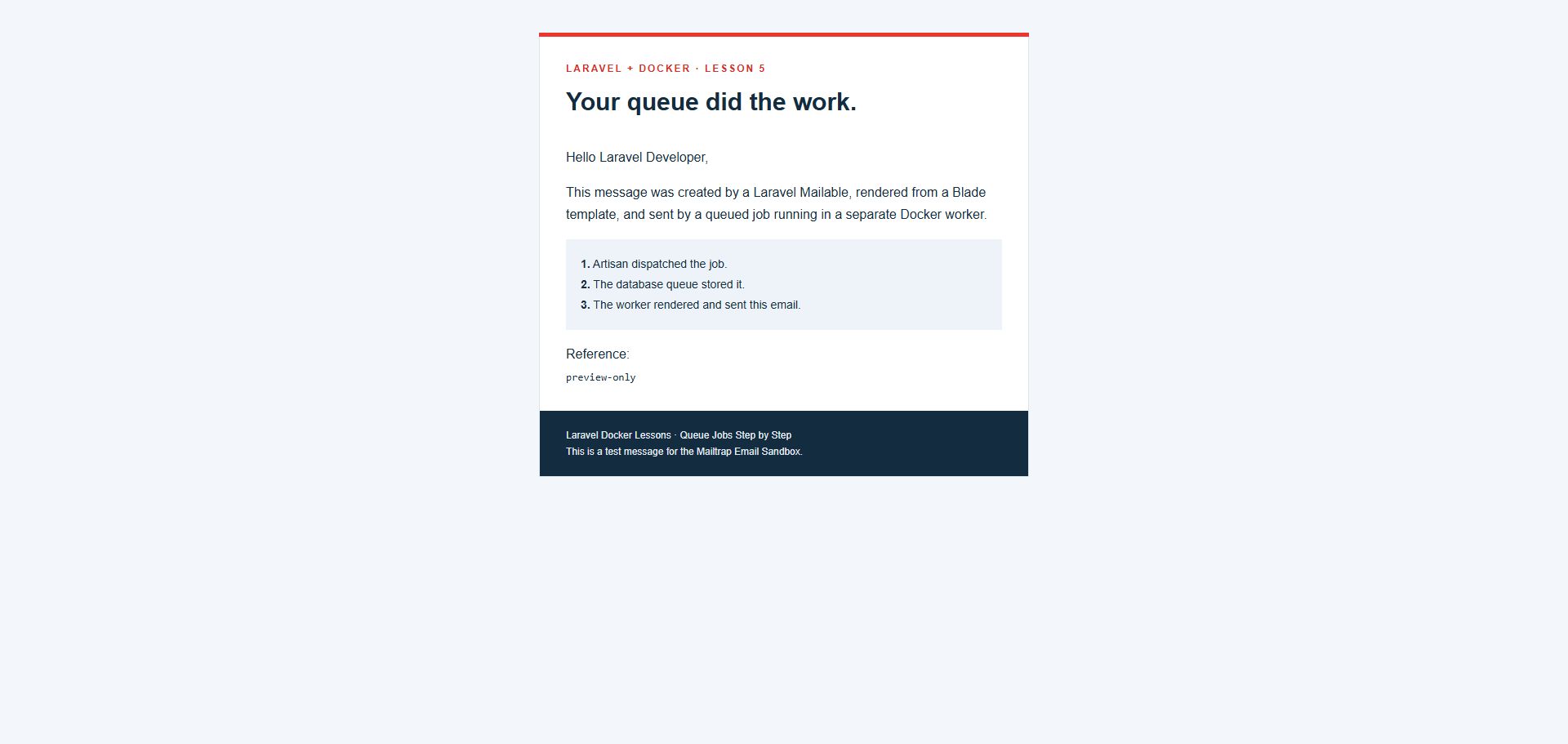
Seventeen automated tests passed with 58 assertions. An isolated Docker check used the real MySQL jobs table and Laravel worker with an explicitly substituted in-memory mail transport: one job waited with zero inline messages, then the worker consumed it and rendered one email. There were no new failed jobs. The PHP image built successfully with PCNTL; Compose validation and formatting checks passed. The worker and scheduler were stopped after verification.
Actual Mailtrap capture remains a separate verification step using your private Sandbox SMTP credentials. No Mailtrap password is committed, embedded in a job payload, or included in this article.