


Laravel Docker Lessons · Lesson 4
Run Laravel scheduled tasks in Docker and watch a real five-second example on a Blade page. This lesson creates one synthetic user per run, with a random test name, a timestamped unique email and a hashed password. It also carries forward the Nginx fixes needed after the Lesson 3 snapshot.
The source of truth is the lesson-4 tag. Repository access may require authorization. The recorded Urdu walkthrough is now available: watch Lesson 4 on YouTube.
Builds on the lesson-3 snapshot. This lesson fixes that snapshot's Nginx configuration, adds a Docker scheduler service, and displays generated users on a Blade page.
How it works
app/Console/Commands/CreateTestUser.phpregistersdemo:create-user. One invocation creates one user, not a permanent loop.routes/console.phpschedules the command witheveryFiveSeconds(). The schedule is skipped unlessscheduler-demo.enabledis true.withoutOverlapping(1)uses a one-minute lock expiry to avoid overlapping command executions in the single scheduler container.- The optional Compose
schedulerservice runsphp artisan schedule:work --no-interactionin the foreground using the same PHP 8.2 FPM image and source asweb. It explicitly enables the example. Thewebservice leaves the example disabled. - Both services connect to MySQL at
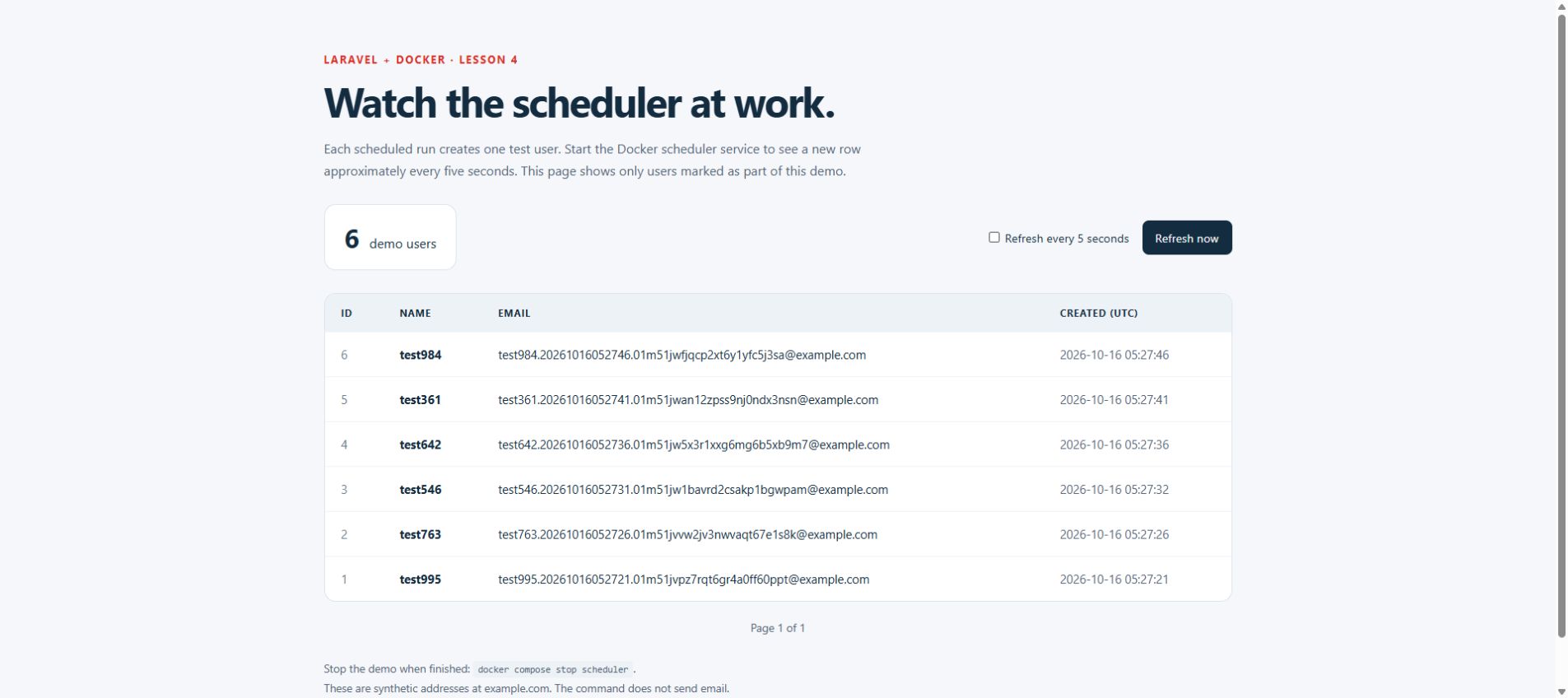
db:3306. The scheduler uses the file cache for its local overlap lock; run just one scheduler replica. This setup does not claim a distributed lock across containers. /scheduler-demorenders a paginated Blade table of users markedis_scheduler_demo = true. It shows ID, name, email and UTC creation time, with newest users first. Automatic five-second page refresh can be paused. Passwords and ordinary users are not displayed.
The name is test plus a random integer from 1 to 1000, such as test42. The email includes that name, a UTC timestamp, a ULID suffix and the reserved domain example.com. For example, the format is test42.YYYYMMDDHHMMSS.ulid@example.com. The suffix avoids collisions if two invocations have the same name and second. Passwords are random and hashed through the existing User model. No email is sent.
Why a scheduler worker instead of a five-second crontab
Ordinary five-field cron expressions run at minute granularity. Laravel handles sub-minute repetition through everyFiveSeconds(). This Compose setup uses a persistent schedule:work process, so it does not install an OS cron daemon or add a host crontab. The worker waits for the next minute boundary before starting its first schedule:run; that run continues until the minute ends to handle five-second tasks.
On a separate server that already runs the Laravel scheduler from cron, the conventional trigger is:
* * * * * cd /path/to/application && php artisan schedule:run >> /dev/null 2>&1That line is an explanation of the alternative, not a file installed by this repository. Do not also run that trigger against this demo while its Compose scheduler is running, or you can create duplicate executions.
Start the application
Use PHP 8.2+ and Docker Compose. Composer dependencies and frontend assets are prepared on the host, as in earlier lessons; the Dockerfile does not install Composer or Node.js.
The PHP services mount an anonymous vendor volume populated from the built image. This keeps Composer's thousands of files on the Docker filesystem, avoiding slow Windows bind-mount reads on each five-second command. Run composer install before building. If Composer dependencies change later, stop this stack with docker compose --profile scheduler down (without -v), then rebuild and start it again; newly created anonymous vendor volumes receive the rebuilt dependencies. The named MySQL volume is retained. Anonymous storage/cache volumes also belong to the local containers, so retain any needed local uploads/logs separately before recreating the entire stack.
For a fresh checkout:
cp .env.example .env
composer install
php artisan key:generate
npm ci
npm run build
docker compose config --quiet
docker compose up -d --build db web nginx
docker compose exec web php artisan config:clear
docker compose exec web php artisan migrate --force
docker compose exec nginx nginx -t
In PowerShell, use Copy-Item .env.example .env instead of cp if preferred. Do not overwrite an existing .env or regenerate an existing application key. When updating an existing checkout, install changed dependencies if needed, rebuild/recreate services, clear the container config and run migrations. The new migration adds an indexed boolean is_scheduler_demo, defaulting to false; existing users remain ordinary users.
Compose explicitly supplies Laravel's MySQL connection, including clearing DB_URL and DB_SOCKET, so the host's SQLite example does not accidentally direct container writes elsewhere. For host-side Artisan commands the original .env still applies; run migrations and this example inside Docker to use the Docker database.
Nginx defaults to http://localhost:8080; MySQL is reachable by a host client at 127.0.0.1:3308. Inside Docker use db:3306. If host ports are occupied, set APP_PORT and DB_FORWARD_PORT in your private .env, for example APP_PORT=8082 and DB_FORWARD_PORT=3309, then recreate the affected services. The dbdata volume is retained. Example root credentials are for this local tutorial; existing MySQL volumes retain their original initialization credentials.
If you recreate web while Nginx remains running and see a 502 response, run docker compose restart nginx so Nginx resolves the current PHP-FPM container address again.
Run and record the demo
# Optional: create exactly one user before starting the repeating schedule.
docker compose run --rm -e SCHEDULER_DEMO_ENABLED=true web php artisan demo:create-user

# Show the registered five-second task, then start the dedicated scheduler.
docker compose --profile scheduler run --rm scheduler php artisan schedule:list
docker compose --profile scheduler up -d scheduler
docker compose logs -f scheduler
Open http://localhost:8080/scheduler-demo (or your configured HTTP port). Wait for the next minute boundary after starting the worker, then rows should appear approximately every five seconds. This is not a hard real-time guarantee: execution time, machine load and refresh timing affect what appears on screen. The table shows 15 users per page and only rows created by this demo.
Command output is appended to the scheduler container's storage/logs/scheduler-demo.log:
docker compose exec scheduler tail -n 20 storage/logs/scheduler-demo.logThe table may contain repeated names because the random range is deliberately only 1–1000. Emails remain distinct. A direct demo:create-user invocation in web without the explicit environment opt-in fails without inserting a record.
Stop after recording
docker compose stop scheduler
docker compose --profile scheduler ps
Refresh the page manually to confirm the count stays stable. The scheduler creates roughly 12 users per minute while active, so stop it after the example. It is behind the scheduler profile and is not started by a normal docker compose up -d.
To stop the entire local stack while preserving MySQL data:
docker compose --profile scheduler downDo not add -v if you want to retain the lesson's database. Recreate the scheduler after changing its code or environment; its restart: unless-stopped policy restarts a failed worker but respects an explicit stop.
Corrections carried forward from Lesson 3
- Replaced the invalid
listen 80.withlisten 80;. - Restored
$query_stringin the front-controller fallback. - Added missing semicolons to FastCGI directives and
deny all. - Restored a Docker build definition shared by
webandscheduler. - Added MySQL readiness checking and explicit Laravel container DB settings.
- Added an image-populated anonymous
vendorvolume for responsive PHP execution on Docker Desktop with a Windows source bind mount. - Removed the unused
MYSQL_PASSWORDsetting, which had no accompanyingMYSQL_USER. - Added
.dockerignoreso local.env, Git history, generated publishing/video files and host Node dependencies are not copied into the image. Runtime source remains a bind mount, matching this local development architecture. - Used
COPY --chown=www-data:www-datainstead of recursively changing ownership of the entire copied project in later image layers; Laravel's writable directories retain mode 775.
The old lesson tags are immutable snapshots; these fixes belong to lesson-4, rather than rewriting lesson-3.
Checks
php vendor/bin/pest
php vendor/bin/pint --test
docker compose --profile scheduler config --quiet
docker compose exec nginx nginx -t
The feature tests use an in-memory SQLite database and cover command output data, password hashing, unique emails, opt-in behavior, the five-second schedule, demo-only visibility and pagination. Container smoke verification separately checks MySQL inserts and the actual scheduler timing.
The implemented command, schedule and database marker
These are the actual lesson files. The command performs one insert; Laravel supplies the repetition. The boolean marker lets the demo page list only these synthetic records without mixing in ordinary users.
app/Console/Commands/CreateTestUser.php
<?php

namespace App\Console\Commands;

use App\Models\User;
use Illuminate\Console\Command;
use Illuminate\Support\Str;

class CreateTestUser extends Command
{
    protected $signature = 'demo:create-user';

    protected $description = 'Create one test user for the Lesson 4 scheduler demo';

    public function handle(): int
    {
        if (! config('scheduler-demo.enabled')) {
            $this->warn('Scheduler demo is disabled. Set SCHEDULER_DEMO_ENABLED=true to enable it.');

            return self::FAILURE;
        }

        $name = 'test'.random_int(1, 1000);
        $email = $name.'.'.now()->utc()->format('YmdHis').'.'.strtolower((string) Str::ulid()).'@example.com';

        $user = User::create([
            'name' => $name,
            'email' => $email,
            'password' => Str::random(40),
            'is_scheduler_demo' => true,
        ]);

        $this->info("Created user #{$user->id}: {$user->name} <{$user->email}>");

        return self::SUCCESS;
    }
}
config/scheduler-demo.php
<?php

return [
    'enabled' => env('SCHEDULER_DEMO_ENABLED', false),
];
routes/console.php
<?php

use Illuminate\Foundation\Inspiring;
use Illuminate\Support\Facades\Artisan;
use Illuminate\Support\Facades\Schedule;

Artisan::command('inspire', function () {
    $this->comment(Inspiring::quote());
})->purpose('Display an inspiring quote');

Schedule::command('demo:create-user')
    ->everyFiveSeconds()
    ->withoutOverlapping(1)
    ->when(fn () => config('scheduler-demo.enabled'))
    ->appendOutputTo(storage_path('logs/scheduler-demo.log'));
database/migrations/2026_10_16_000001_add_is_scheduler_demo_to_users_table.php
<?php

use Illuminate\Database\Migrations\Migration;
use Illuminate\Database\Schema\Blueprint;
use Illuminate\Support\Facades\Schema;

return new class extends Migration
{
    public function up(): void
    {
        Schema::table('users', function (Blueprint $table) {
            $table->boolean('is_scheduler_demo')->default(false)->index();
        });
    }

    public function down(): void
    {
        Schema::table('users', function (Blueprint $table) {
            $table->dropColumn('is_scheduler_demo');
        });
    }
};
The existing User model hashes the password through its hashed cast. It now also includes is_scheduler_demo in $fillable and casts the marker to boolean.
Docker Compose: share PHP, separate the scheduler process
docker-compose.yaml
x-laravel-environment: &laravel-environment
  DB_URL: ""
  DB_SOCKET: ""
  DB_CONNECTION: mysql
  DB_HOST: db
  DB_PORT: 3306
  DB_DATABASE: laravel_app
  DB_USERNAME: root
  DB_PASSWORD: root

x-laravel-service: &laravel-service
  build:
    context: .
    dockerfile: Dockerfile
  image: my-laravel-app
  working_dir: /var/www/html
  user: "www-data"
  volumes:
    - .:/var/www/html
    - /var/www/html/vendor
    - /var/www/html/storage
    - /var/www/html/bootstrap/cache
  environment:
    <<: *laravel-environment
    SCHEDULER_DEMO_ENABLED: "false"
  depends_on:
    db:
      condition: service_healthy

services:
  web:
    <<: *laravel-service

  scheduler:
    <<: *laravel-service
    profiles: ["scheduler"]
    init: true
    command: ["php", "artisan", "schedule:work", "--no-interaction"]
    restart: unless-stopped
    environment:
      <<: *laravel-environment
      CACHE_STORE: file
      SCHEDULER_DEMO_ENABLED: "true"

  nginx:
    image: nginx:latest
    ports:
      - "${APP_PORT:-8080}:80"
    volumes:
      - .:/var/www/html:ro
      - ./.docker/nginx/default.conf:/etc/nginx/conf.d/default.conf:ro
    depends_on:
      - web

  db:
    image: mysql:8.0
    environment:
      MYSQL_ROOT_PASSWORD: root
      MYSQL_DATABASE: laravel_app
    ports:
      - "${DB_FORWARD_PORT:-3308}:3306"
    volumes:
      - dbdata:/var/lib/mysql
    healthcheck:
      test: ["CMD-SHELL", "mysqladmin ping -h 127.0.0.1 -p\"$${MYSQL_ROOT_PASSWORD}\" --silent"]
      interval: 5s
      timeout: 5s
      retries: 20
      start_period: 20s

volumes:
  dbdata:
Dockerfile
FROM php:8.2-fpm

WORKDIR /var/www/html

RUN apt-get update && apt-get install -y \
    libzip-dev \
    unzip \
    && docker-php-ext-install zip pdo_mysql \
    && rm -rf /var/lib/apt/lists/*

COPY --chown=www-data:www-data . /var/www/html

RUN chmod -R 775 /var/www/html/storage /var/www/html/bootstrap/cache
The corrected Nginx file
.docker/nginx/default.conf
server {
    listen 80;
    index index.php index.html;
    root /var/www/html/public;

    location / {
        try_files $uri $uri/ /index.php?$query_string;
    }

    location ~ \.php$ {
        include fastcgi_params;
        fastcgi_pass web:9000;
        fastcgi_index index.php;
        fastcgi_param SCRIPT_FILENAME $realpath_root$fastcgi_script_name;
        fastcgi_param PATH_INFO $fastcgi_path_info;
        fastcgi_buffers 16 16k;
        fastcgi_buffer_size 32k;
    }

    location ~ /\.ht {
        deny all;
    }
}
A Blade page to see users appear
app/Http/Controllers/SchedulerDemoController.php
<?php

namespace App\Http\Controllers;

use App\Models\User;
use Illuminate\View\View;

class SchedulerDemoController extends Controller
{
    public function __invoke(): View
    {
        $users = User::query()
            ->where('is_scheduler_demo', true)
            ->orderByDesc('id')
            ->paginate(15, ['id', 'name', 'email', 'created_at']);

        return view('scheduler-demo', compact('users'));
    }
}
The named GET route /scheduler-demo calls this controller. The resources/views/scheduler-demo.blade.php template escapes displayed values with Blade interpolation, renders the paginated rows and includes a five-second refresh checkbox plus a manual refresh button. It displays neither passwords nor regular user accounts.
Register the users view route: routes/web.php
This is the Lesson 4 route file. The named /scheduler-demo route calls the controller shown above and passes its paginated demo users to the Blade template.
<?php

use App\Http\Controllers\SchedulerDemoController;
use Illuminate\Support\Facades\Route;

Route::get('/', function () {
    return view('welcome');
});

Route::get('/scheduler-demo', SchedulerDemoController::class)->name('scheduler-demo');
resources/views/scheduler-demo.blade.php
Create this Blade file with the complete Lesson 4 implementation below. It includes the demo-user count, ID/name/email/UTC columns, an empty state, pagination, manual refresh, and an optional five-second auto-refresh setting remembered for this browser session. Blade escapes the displayed user values.
<!DOCTYPE html>
<html lang="en">
<head>
    <meta charset="utf-8">
    <meta name="viewport" content="width=device-width, initial-scale=1">
    <title>Lesson 4 · Laravel Docker Scheduler</title>
    <style>
        :root { color-scheme: light; font-family: ui-sans-serif, system-ui, sans-serif; color: #142c40; background: #f5f7fa; }
        * { box-sizing: border-box; }
        body { margin: 0; }
        main { max-width: 1160px; margin: 64px auto; padding: 0 24px; }
        .eyebrow { color: #db3026; font-size: .8rem; font-weight: 750; letter-spacing: .14em; text-transform: uppercase; }
        h1 { font-size: clamp(2rem, 5vw, 3.1rem); line-height: 1.15; margin: 14px 0; letter-spacing: -.04em; }
        .intro { max-width: 720px; color: #526477; line-height: 1.7; }
        .summary { display: flex; flex-wrap: wrap; align-items: center; gap: 20px; margin: 28px 0; }
        .count { background: #fff; border: 1px solid #dce4ed; border-radius: 14px; padding: 18px 24px; }
        .count strong { font-size: 2rem; margin-right: 8px; }
        .refresh { margin-left: auto; display: flex; align-items: center; flex-wrap: wrap; gap: 16px; font-size: .9rem; }
        button, .pagination a { color: #fff; background: #142c40; border: 0; border-radius: 8px; padding: 11px 16px; font: inherit; cursor: pointer; text-decoration: none; }
        .table-wrap { overflow-x: auto; border: 1px solid #dce4ed; border-radius: 14px; background: #fff; }
        table { border-collapse: collapse; width: 100%; text-align: left; font-size: .92rem; }
        th { background: #edf2f7; padding: 15px 20px; font-size: .75rem; letter-spacing: .06em; text-transform: uppercase; white-space: nowrap; }
        td { padding: 17px 20px; border-top: 1px solid #edf2f7; }
        td:first-child { color: #6a7b8b; }
        .name { font-weight: 700; }
        .email { overflow-wrap: anywhere; min-width: 270px; }
        .time { white-space: nowrap; color: #526477; }
        .empty { padding: 40px 24px; text-align: center; color: #526477; line-height: 1.8; }
        code { background: #edf2f7; padding: 3px 6px; border-radius: 4px; font-size: .85em; }
        .pagination { margin-top: 22px; display: flex; align-items: center; justify-content: space-between; gap: 20px; }
        .pagination span, footer { color: #526477; font-size: .85rem; }
        footer { margin-top: 30px; line-height: 1.7; }
        a:focus-visible, button:focus-visible, input:focus-visible { outline: 3px solid #2188d5; outline-offset: 4px; }
        @media (max-width: 640px) { main { margin-top: 32px; padding: 0 16px; } .refresh { margin-left: 0; } }
    </style>
</head>
<body>
<main>
    <div class="eyebrow">Laravel + Docker · Lesson 4</div>
    <h1>Watch the scheduler at work.</h1>
    <p class="intro">Each scheduled run creates one test user. Start the Docker scheduler service to see a new row approximately every five seconds. This page shows only users marked as part of this demo.</p>

    <section class="summary" aria-label="Demo summary">
        <div class="count"><strong>{{ number_format($users->total()) }}</strong> demo users</div>
        <div class="refresh">
            <label><input type="checkbox" id="auto-refresh" checked> Refresh every 5 seconds</label>
            <button type="button" id="refresh-now">Refresh now</button>
        </div>
    </section>

    <div class="table-wrap">
        <table aria-label="Users created by the Lesson 4 scheduler">
            <thead><tr><th scope="col">ID</th><th scope="col">Name</th><th scope="col">Email</th><th scope="col">Created (UTC)</th></tr></thead>
            <tbody>
            @forelse ($users as $user)
                <tr>
                    <td>{{ $user->id }}</td>
                    <td class="name">{{ $user->name }}</td>
                    <td class="email">{{ $user->email }}</td>
                    <td class="time"><time datetime="{{ $user->created_at->toIso8601String() }}">{{ $user->created_at->utc()->format('Y-m-d H:i:s') }}</time></td>
                </tr>
            @empty
                <tr><td colspan="4" class="empty">No demo users yet.<br>After running migrations, start <code>docker compose --profile scheduler up -d scheduler</code>.<br>The worker starts its first scheduled minute at the next minute boundary.</td></tr>
            @endforelse
            </tbody>
        </table>
    </div>

    <nav class="pagination" aria-label="Demo user pages">
        <div>@if ($users->previousPageUrl())<a href="{{ $users->previousPageUrl() }}">← Newer users</a>@endif</div>
        <span>Page {{ $users->currentPage() }} of {{ $users->lastPage() }}</span>
        <div>@if ($users->nextPageUrl())<a href="{{ $users->nextPageUrl() }}">Older users →</a>@endif</div>
    </nav>
    <footer>Stop the demo when finished: <code>docker compose stop scheduler</code>.<br>These are synthetic addresses at example.com. The command does not send email.</footer>
</main>
<script>
    const refreshPreference = sessionStorage.getItem('scheduler-demo-auto-refresh') !== 'off';
    const autoRefresh = document.getElementById('auto-refresh');
    autoRefresh.checked = refreshPreference;
    autoRefresh.addEventListener('change', () => {
        sessionStorage.setItem('scheduler-demo-auto-refresh', autoRefresh.checked ? 'on' : 'off');
    });
    document.getElementById('refresh-now').addEventListener('click', () => window.location.reload());
    window.setInterval(() => {
        if (autoRefresh.checked && !document.hidden) window.location.reload();
    }, 5000);
</script>
</body>
</html>
Open http://localhost:8080/scheduler-demo, using your configured APP_PORT if different. Start the optional scheduler to create rows and pause auto-refresh when inspecting users or navigating pages. Stop user creation after the demonstration with docker compose stop scheduler.
What was verified
- The PHP image built successfully and Docker Compose accepted the configuration.
- MySQL migrations completed in an isolated local Docker project.
- Nginx passed
nginx -tand the Blade endpoint returned HTTP 200. - Eight tests passed with 31 assertions, including command behavior, unique emails, disabled runs, scheduler registration, demo-only visibility and pagination.
- Four additional users were observed during the timed verification window. Their successive insert intervals were 4.0, 5.0, 5.0 seconds; the median was five seconds.
- The scheduler was stopped and the user count stayed stable. No production user database was used for the example.