


Lesson 4 correction: use the fixed Nginx configuration
Update, 16 October 2026: the original lesson-3 tag below is preserved as its historical snapshot. The corrected, tested configuration is now part of the lesson-4 tag; the old tag has not been moved or rewritten.
The fixes replace listen 80. with listen 80;, restore $query_string, and add the missing FastCGI and access-rule semicolons. Use this complete corrected server block:
.docker/nginx/default.conf
server {
    listen 80;
    index index.php index.html;
    root /var/www/html/public;

    location / {
        try_files $uri $uri/ /index.php?$query_string;
    }

    location ~ \.php$ {
        include fastcgi_params;
        fastcgi_pass web:9000;
        fastcgi_index index.php;
        fastcgi_param SCRIPT_FILENAME $realpath_root$fastcgi_script_name;
        fastcgi_param PATH_INFO $fastcgi_path_info;
        fastcgi_buffers 16 16k;
        fastcgi_buffer_size 32k;
    }

    location ~ /\.ht {
        deny all;
    }
}
Lesson 4 also restores the PHP image build definition and explicitly connects Laravel containers to db:3306. The new Compose file adds a MySQL readiness health check, retains the named database volume and provides configurable HTTP/database host ports. Its optional scheduler service is separate from Nginx and PHP-FPM.
After preparing dependencies and the private environment, validate and start the updated stack:
git fetch origin --tags
git switch main
git pull --ff-only origin main
docker compose --profile scheduler config --quiet
docker compose up -d --build db web nginx
docker compose exec web php artisan config:clear
docker compose exec web php artisan migrate --force
docker compose restart nginx
docker compose exec nginx nginx -t
Save or commit any local edits before switching or pulling. This follows the current main branch; for the exact corrected lesson snapshot, inspect lesson-4 in a separate checkout. The Lesson 4 guide includes the full Compose file, scheduler command, database migration and Blade user page. Read Lesson 4: Laravel Scheduler and Cron Jobs with Docker.
Historical snapshot follows: configuration errors described below refer to the original Lesson 3 tag, before the corrections above.
Laravel Docker Lessons · Lesson 3
Lesson 3 changes the architecture from Apache with embedded PHP to separate Nginx and PHP-FPM services, while retaining MySQL. It builds on Lesson 2: Adding MySQL to Laravel’s Apache Docker Setup. This article reproduces the pushed tag exactly, including the configuration issues that need attention before the intended request path can work.
Snapshot status: the committed Nginx file contains syntax errors, and the web service no longer has a build definition. This is a configuration walkthrough and troubleshooting lesson, not a claim that the tagged stack starts successfully unchanged.
Use the correct lesson snapshot
This article documents the lesson-3 GitLab tag. The repository is currently private, so viewing it requires authorized access. Its commit is 640e6e7e1b021b8a8b36a158d5cfdbaaef844996.
To inspect it without changing your current lesson checkout, create a separate Git worktree:
git fetch origin --tags
git worktree add --detach ../docker-laravel-lesson-3 lesson-3
cd ../docker-laravel-lesson-3
Prepare the host dependencies with composer install, npm ci and npm run build. For a fresh checkout, copy .env.example to .env and generate a local key with php artisan key:generate. The Dockerfile does not install Composer or Node.js. Review the database connection explicitly before running migrations.
1. The intended three-service request path
The browser enters through localhost:8080, mapped to Nginx port 80. Nginx serves files from /var/www/html/public and is intended to forward PHP requests to web:9000 using FastCGI. The web service should run PHP-FPM. MySQL remains reachable internally as db:3306; the host database mapping changes to 3308:3306.
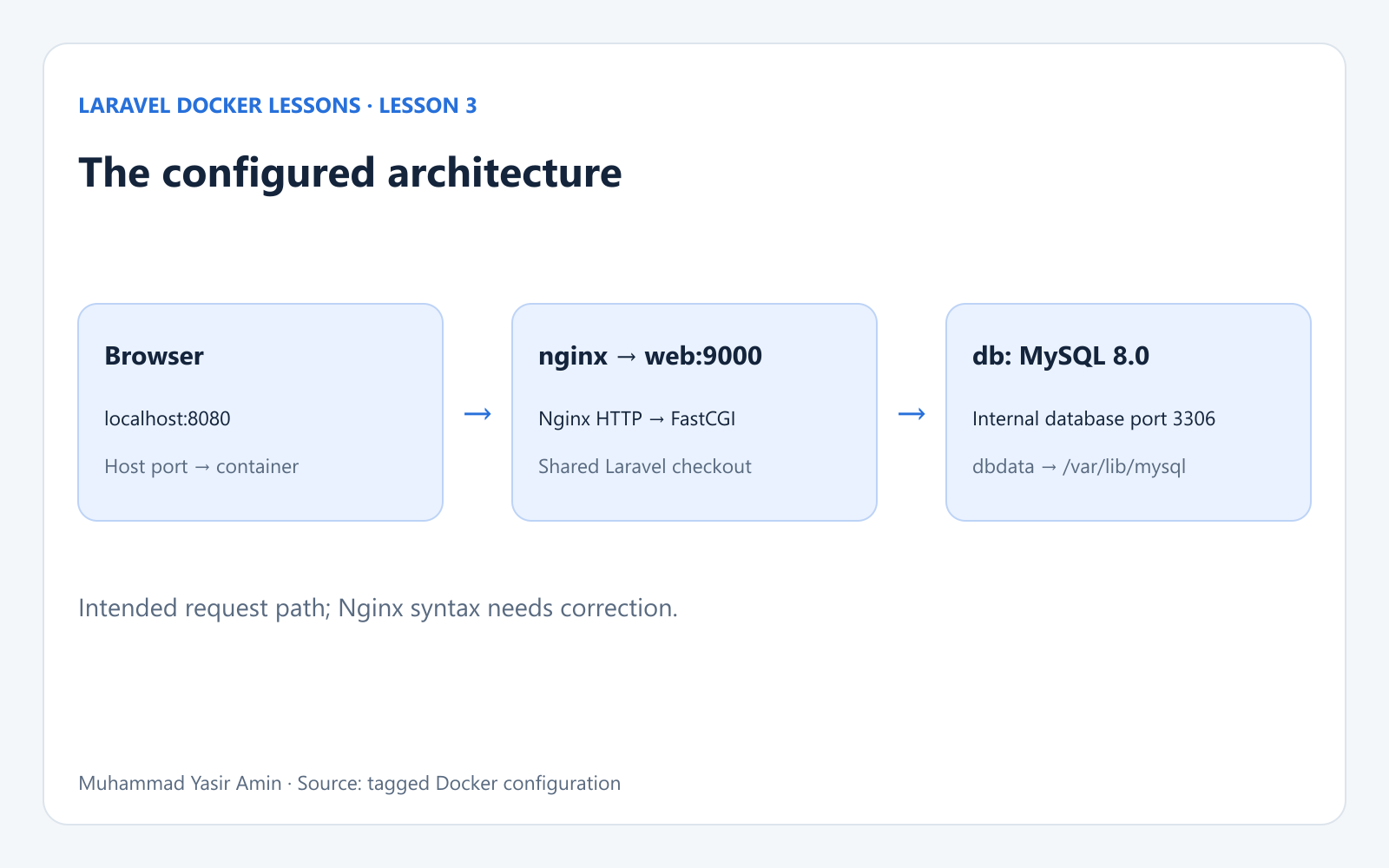
Lesson 3 intended architecture: browser, Nginx, PHP FPM and MySQL; configuration needs correction.
2. PHP switches from Apache to FPM
FROM php:8.2-fpm

WORKDIR /var/www/html

RUN apt-get update && apt-get install -y \
    libzip-dev \
    unzip \
    && docker-php-ext-install zip pdo_mysql

COPY . /var/www/html

RUN chown -R www-data:www-data /var/www/html
RUN chown -R www-data:www-data /var/www/html/storage /var/www/html/bootstrap/cache
RUN chmod -R 775 /var/www/html/storage /var/www/html/bootstrap/cache
The base image becomes php:8.2-fpm. Apache and a2enmod rewrite are removed. ZIP, PDO MySQL, the application copy and Laravel directory permissions remain. PHP-FPM receives FastCGI requests; it does not replace Nginx as an HTTP server. Both services mount the same checkout so the script paths agree.
3. The actual Compose services
services:
  web:
    image: my-laravel-app
    volumes:
      - .:/var/www/html
      - /var/www/html/storage
      - /var/www/html/bootstrap/cache
    working_dir: /var/www/html
    user: "www-data"
    depends_on:
      - db

  nginx:
    image: nginx:latest
    ports:
      - "8080:80"
    volumes:
      - .:/var/www/html
      - ./.docker/nginx/default.conf:/etc/nginx/conf.d/default.conf
    depends_on:
      - web

  db:
    image: mysql:8.0
    environment:
      MYSQL_ROOT_PASSWORD: root
      MYSQL_DATABASE: laravel_app
      MYSQL_PASSWORD: secret
    ports:
      - "3308:3306"
    volumes:
      - dbdata:/var/lib/mysql
volumes:
  dbdata:
The web service has no published HTTP port and no Apache config mount. Nginx gains the HTTP mapping and its own configuration mount. It depends on web, while web depends on db. These short dependencies control startup order, not application readiness. The MySQL named volume remains dbdata.
Image preparation gap: web refers to my-laravel-app but no longer declares build. Therefore docker compose up --build does not rebuild this Dockerfile. A previously built Apache image can still occupy that name. At review time, the local image's command was apache2-foreground, confirming that image reuse needs attention. To deliberately build the FPM image from this tag before starting it, use:
docker build -t my-laravel-app .
docker image inspect my-laravel-app --format "{{json .Config.Cmd}}"
This is an explicit reproduction step derived from the Dockerfile, not a build step already automated by Compose. Inspect the result for the FPM startup command before expecting web:9000 to accept connections. Avoid running Apache and FPM lessons simultaneously under the same local image tag.
4. Read the committed Nginx configuration
server {
    listen 80.
    index index.php index.html;
    root /var/www/html/public;

    location / {
        try_files $uri $uri/ /index.php?query_string;
    }

    location ~ \.php$ {
        include fastcgi_params;
        fastcgi_pass web:9000
        fastcgi_index index.php
        fastcgi_param SCRIPT_FILENAME $realpath_root$fastcgi_script_name
        fastcgi_param PATH_INFO $fastcgi_path_info
        fastcgi_buffers 16 16k
        fastcgi_buffer_size 32k
    }

    location ~ /\.ht {
        deny all
    }
}
The root points to Laravel's public directory. The PHP location is intended to send FastCGI requests to web, with SCRIPT_FILENAME identifying the PHP script and PATH_INFO passing path information. The final location is intended to deny requests for .ht files. Unlike Apache, Nginx does not consume Laravel's .htaccess.
5. Configuration corrections required before startup
An isolated Nginx syntax check against the exact tagged file failed with host not found in "80." of the "listen" directive. The check used a temporary container and a read-only configuration mount; it did not restart the application stack or change the source files.
The following are recommended corrections to the displayed snapshot. They were not committed as part of the lesson-3 tag, and this article does not silently substitute them for the source:
listen 80.must becomelisten 80;.The front-controller fallback
/index.php?query_stringneeds the variable:/index.php?$query_string.Add trailing semicolons to
fastcgi_pass,fastcgi_index, bothfastcgi_paramdirectives,fastcgi_buffers,fastcgi_buffer_sizeanddeny all.Build the PHP-FPM Dockerfile explicitly, or restore a Compose build definition in a later reviewed change.
A YAML configuration check can succeed while the mounted Nginx file is invalid. After making the corrections in your own checkout and preparing the FPM image, use the service-level checks below. If nginx -t fails, resolve that before testing HTTP:
docker compose config
docker compose up -d
docker compose ps
docker compose logs --tail=80 nginx web db
docker compose exec web php -m
The --no-deps syntax check can also report an unresolved web upstream if no web service is running. That is distinct from the punctuation errors. The lesson files were reviewed without restarting the existing stack, rebuilding its image or migrating its database.
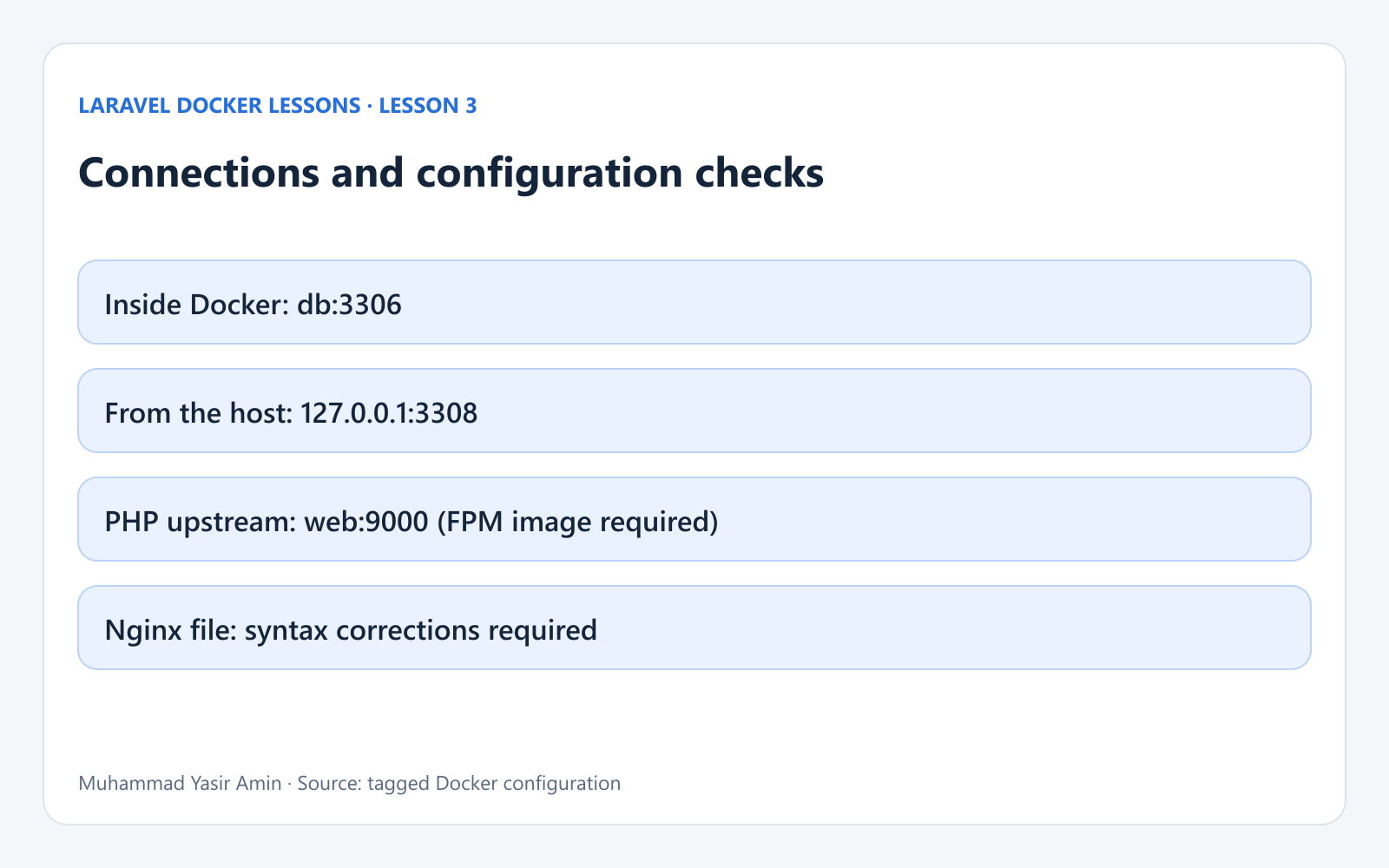
Docker service connections and configuration review notes.
Database settings: distinguish the container from Laravel
The committed .env.example still sets DB_CONNECTION=sqlite. Adding a MySQL container does not automatically change Laravel's database connection. The inspected local checkout also selects SQLite. The repository therefore demonstrates the MySQL service configuration, but does not establish that Laravel has switched to MySQL.
For a deliberate local MySQL connection, the values below are derived from the Compose service. They are a suggested private .env change, not a committed configuration or a verified migration:
DB_CONNECTION=mysql
DB_HOST=db
DB_PORT=3306
DB_DATABASE=laravel_app
DB_USERNAME=root
DB_PASSWORD=root
Inside the web container, db:3306 is the database endpoint. A host-side database client instead uses 127.0.0.1 and the published host port. The Compose sample uses the root password root. Its MYSQL_PASSWORD: secret does not create a separate application user because MYSQL_USER is absent. These are local example credentials, not production credentials.
After intentionally configuring MySQL and confirming it is ready, run docker compose exec web php artisan config:clear, then docker compose exec web php artisan migrate. Migrations create the application tables in the selected database; they do not transfer existing SQLite records. The database-backed session, cache and queue defaults also need their tables in the selected connection.
The named dbdata volume stores MySQL data at /var/lib/mysql. Initialization variables apply when the data directory is first initialized; changing Compose values does not reset an existing database. Preserve this volume when stopping the stack.
What changes, and what still needs work
Lesson 3 defines the separation between HTTP serving, PHP execution and database storage. Its intended HTTP port is 8080 and its host-side MySQL port is 3308. The committed Nginx syntax and image preparation must be resolved to make that architecture operational. Laravel's tracked environment example remains SQLite, so a MySQL switch must be deliberate.
Return to Lesson 1 · Lesson 2: Adding MySQL to Laravel’s Apache Docker Setup · Browse the course. New lesson videos can be added to the course when published.
References
The tagged project files are the source of truth. Supporting behavior is documented in Docker Compose startup order, the official MySQL image, Laravel database configuration and Nginx FastCGI configuration.